

Le Static Application Security Testing (SAST) s'est imposé comme une bonne pratique de codage sécurisé dans les workflows DevSecOps. Ainsi, il permet aux développeurs d'identifier et de corriger des vulnérabilités très tôt dans le pipeline de développement — sans exécuter le code.
Si tous les outils SAST contribuent à sécuriser votre base de code, certains s'intégreront mieux que d'autres à votre façon de travailler. En effet, démarrer un programme SAST avec des outils open source permet d'évaluer ce qui répond à vos besoins sans engagement financier initial. Pour renforcer encore vos pratiques de développement sécurisé, pensez à consulter des bonnes pratiques adaptées au développement sécurisé.
Dans cet article, nous allons voir comment tirer parti du SAST pour votre code security. Nous passerons également en revue les fonctionnalités clés des outils SAST open source, comme la prise en charge des langages, les capacités d'intégration et les fonctionnalités de reporting. Entrons dans le vif du sujet.
Qu'est-ce que le SAST ?
Le Static Application Security Testing (SAST) est une méthode automatisée d'analyse de code qui examine le code source pour y détecter des vulnérabilités sans exécuter le programme. Ainsi, les outils SAST s'intègrent directement aux IDE des développeurs et aux pipelines CI/CD, offrant ainsi une occasion précoce d'identifier des problèmes de sécurité potentiels. Cette détection en amont permet aux développeurs de corriger les vulnérabilités alors que le contexte du code est encore frais à l'esprit.
Catch code risks before you deploy
Learn how Wiz Code scans IaC, containers, and pipelines to stop misconfigurations and vulnerabilities before they hit your cloud.

SAST vs DAST
En quoi le SAST diffère-t-il du DAST ? Le Dynamic Application Security Testing (DAST) nécessite la compilation et l'exécution du code testé, ce qui est plus lourd que le SAST. Comme le DAST est plus lent, l'écart de temps pour mener les tests peut être considérable par rapport au SAST.
Autre différence : le DAST est une méthode de test en « boîte noire », c'est-à-dire qu'il envoie des entrées à l'application et observe les réponses. Ainsi, comme il n'analyse ni ne comprend le code, le DAST est plus flexible que le SAST — il n'est pas limité à des langages spécifiques.
En résumé : l'atout du SAST est sa vitesse d'analyse, mais en tant que test en « boîte blanche », cette vitesse se paie en flexibilité. En effet, le SAST doit analyser le code, donc l'outil doit comprendre ce code ; si votre langage n'est pas pris en charge, le DAST peut être votre seule option.
Quelles sont les fonctionnalités clés des outils SAST ?
Des outils SAST efficaces partagent généralement huit capacités essentielles qui conditionnent leur succès dans l'identification des vulnérabilités et leur intégration aux workflows de développement. En effet, ces fonctionnalités ont un impact direct sur la précision de détection, la vitesse de développement et la posture de sécurité à long terme.
Prise en charge des langages et frameworks
La compatibilité avec les langages détermine quels outils SAST vous pouvez utiliser pour vos projets. En effet, les outils doivent parser et comprendre vos langages et frameworks afin d'identifier efficacement les vulnérabilités.
C'est la principale limite : les langages de niche ou récents manquent souvent de support SAST, obligeant les équipes à adopter d'autres méthodes de test. À l'inverse, les langages populaires comme Java, C#, JavaScript et Python bénéficient d'un large choix d'outils SAST.
Capacités d'intégration aux IDE et aux pipelines CI/CD
Les capacités d'intégration déterminent la fluidité avec laquelle les outils SAST s'insèrent dans vos workflows. Ainsi, la plupart des solutions prennent en charge des environnements comme Visual Studio, VS Code et les IDE JetBrains.
L'intégration aux pipelines CI/CD est généralement simple, car la plupart des outils proposent une CLI compatible avec les plateformes d'automatisation standard. En revanche, les équipes qui utilisent des environnements spécialisés ou peu communs peuvent rencontrer des défis de compatibilité au moment de choisir un SAST.
Précision et performance
La précision et l'efficacité varient fortement d'un SAST à l'autre selon deux facteurs critiques : la qualité de la base de données de menaces et la performance de l'implémentation.
Ainsi, la couverture de la base de données de menaces influence directement la détection : des bases limitées ou obsolètes laissent passer des problèmes qu'une solution plus complète détectera. En outre, l'efficacité d'exécution influe sur la vélocité de développement, car des outils SAST mal optimisés peuvent ralentir les pipelines CI/CD et la productivité des développeurs.
Options de personnalisation
Si vous travaillez sur un projet qui a mûri sur des années, voire des décennies, vous avez probablement des exigences spécifiques pour intégrer de nouveaux outils. Vérifiez donc si l'outil SAST choisi supporte ces besoins de personnalisation.
Reporting et analytique
Le reporting et l'analytique peuvent faire ou défaire un projet logiciel : si vous ne savez pas mesurer l'apport de l'outil SAST, il est difficile d'évaluer s'il vaut l'effort. Assurez-vous donc que votre outil produit des outputs mesurables que vous pouvez suivre dans le temps.
Support de conformité
Beaucoup d'entreprises sont soumises à des réglementations nationales ou internationales. Ainsi, les outils SAST peuvent aider à s'y conformer, soit parce qu'ils sont explicitement requis dans le processus de développement, soit parce qu'ils permettent d'identifier des problèmes susceptibles de compromettre la conformité.
Passage à l'échelle
À mesure que votre base de code grandit, vos outils doivent suivre. En effet, si vous avez des millions de lignes de code, un SAST plus rapide peut se traduire par des heures gagnées sur un scan de l'ensemble du système.
Prise en charge des standards ouverts
Évitez le verrouillage dans des interfaces propriétaires. En effet, les standards ouverts vous offrent de la flexibilité et vous permettent de changer d'outil et de base de menaces.
Voir la démo de 5 minutes
Regardez la démo pour découvrir comment Wiz Code analyse l’infrastructure as code, les images de conteneurs et les pipelines CI/CD afin de détecter les risques en amont — avant qu’ils n’atteignent le cloud.
Voir maintenant
Quels sont les meilleurs outils SAST open source ?
Neuf outils SAST open source dominent le marché pour une analyse de code security économique. Ainsi, ils offrent une détection de vulnérabilités de niveau entreprise sans coûts de licence, ce qui en fait un point de départ idéal pour les organisations qui mettent en place des pratiques de développement sécurisé.
1. Mobile Security Framework
MobSF est un outil SAST open source populaire pour le développement iOS et Android. Comme son nom l'indique, il est orienté plateformes mobiles. Ainsi, MobSF peut analyser des langages comme Java, Kotlin, Objective‑C et Swift. Il peut aussi analyser des binaires et des packages comme les fichiers APK, IPA et APPX. En outre, bien que cet article porte sur les outils SAST, il est utile de noter que MobSF embarque aussi un scanner DAST, ce qui en fait un scanner de sécurité applicative complet.
À noter : MobSF ne propose pas d'intégrations IDE.
2. GolangCI-Lint
GolangCI-Lint est un méta-linter rapide pour Go qui agrège plusieurs linters afin de détecter des bugs, des problèmes de style et certains indices de faiblesse de sécurité. Ainsi, il s'intègre bien à la toolchain Go et aux pipelines CI/CD, et ses options de configuration conviennent aux grandes bases de code.

Pour une analyse sécurité dédiée, couplez-le à gosec pour détecter les vulnérabilités courantes dans du code Go (par exemple, risques d'injection, crypto non sécurisée, secrets codés en dur). Ensemble, ils offrent une couverture large de la qualité du code avec des détections sécurité ciblées.
3. PHPStan
PHPStan est un analyseur de code PHP open source très utilisé. Ainsi, l'outil en CLI peut s'exécuter dans vos pipelines CI/CD et produit des outputs compatibles avec GitHub Actions.
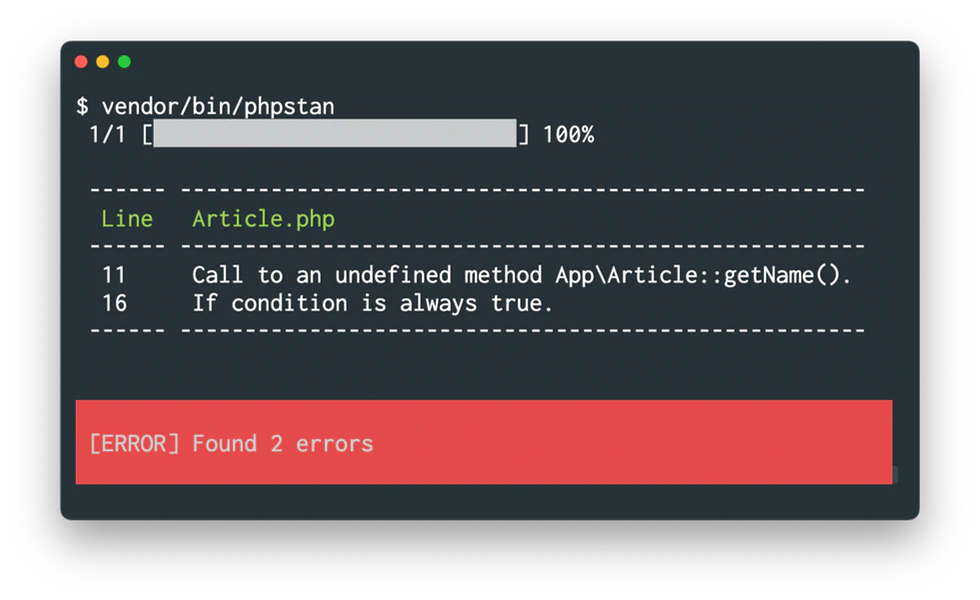
PHPStan vous permet de définir différents niveaux de stricteté pour les règles appliquées ; l'outil est donc très flexible et peut être adopté progressivement dans votre base de code.
Bonus appréciable : bien qu'il tourne sur PHP7, il peut analyser du code destiné à des versions PHP plus anciennes.
4. Semgrep
Semgrep est un moteur SAST open source populaire qui prend en charge des dizaines de langages et frameworks. Ainsi, il scanne le code source à la recherche de problèmes de sécurité, de patterns à risque et de violations de politiques à l'aide de règles communautaires et personnalisées.
Semgrep fournit des résultats actionnables et s'intègre aux pipelines CI/CD et aux workflows des développeurs. En outre, vous pouvez ajuster les règles à votre codebase, réduire le bruit et imposer des standards de codage sécurisé lors des pull requests sans ralentir le développement.
5. Brakeman
Brakeman est un analyseur statique pour Ruby on Rails capable de détecter des problèmes courants comme les injections SQL ou le cross-site scripting. Ainsi, il analyse également vos fichiers de configuration à la recherche de vulnérabilités. La CLI peut générer des rapports détaillés en JSON ou XML (pour ingestion par des outils CI/CD comme Jenkins) ou en HTML (pour la lecture dans un navigateur). En outre, grâce à un déploiement via Docker, la mise en place est relativement simple dans divers environnements.
Comme PHPStan, il vous permet de configurer différents niveaux de notification.
6. Pyre
Facebook a créé Pyre, un vérificateur de types statique pour Python. Cette extension de syntaxe permet de définir des variables avec des types statiques et les compile en Python classique. Ainsi, les types statiques aident à maîtriser la complexité des grandes bases de code et, grâce à l'analyse incrémentale de Pyre, l'outil passe bien à l'échelle.
Pour une analyse orientée sécurité, utilisez Pysa (basé sur Pyre) pour réaliser une taint analysis et détecter des vulnérabilités de flux de données comme les injections et la désérialisation non sécurisée. Ce duo permet d'améliorer la correction du code via les types tout en détectant plus tôt les problèmes de sécurité.
7. Bandit
Bandit est un analyseur de code pour Python qui recherche des problèmes de sécurité courants, tels que des mots de passe codés en dur, des injections SQL ou l'utilisation de fonctions dangereuses. Ainsi, la CLI génère ensuite des rapports détaillés pour aider à la remédiation. En outre, vous pouvez le configurer pour ignorer les vulnérabilités connues comme non pertinentes, afin d'éviter la fatigue d'alerte.
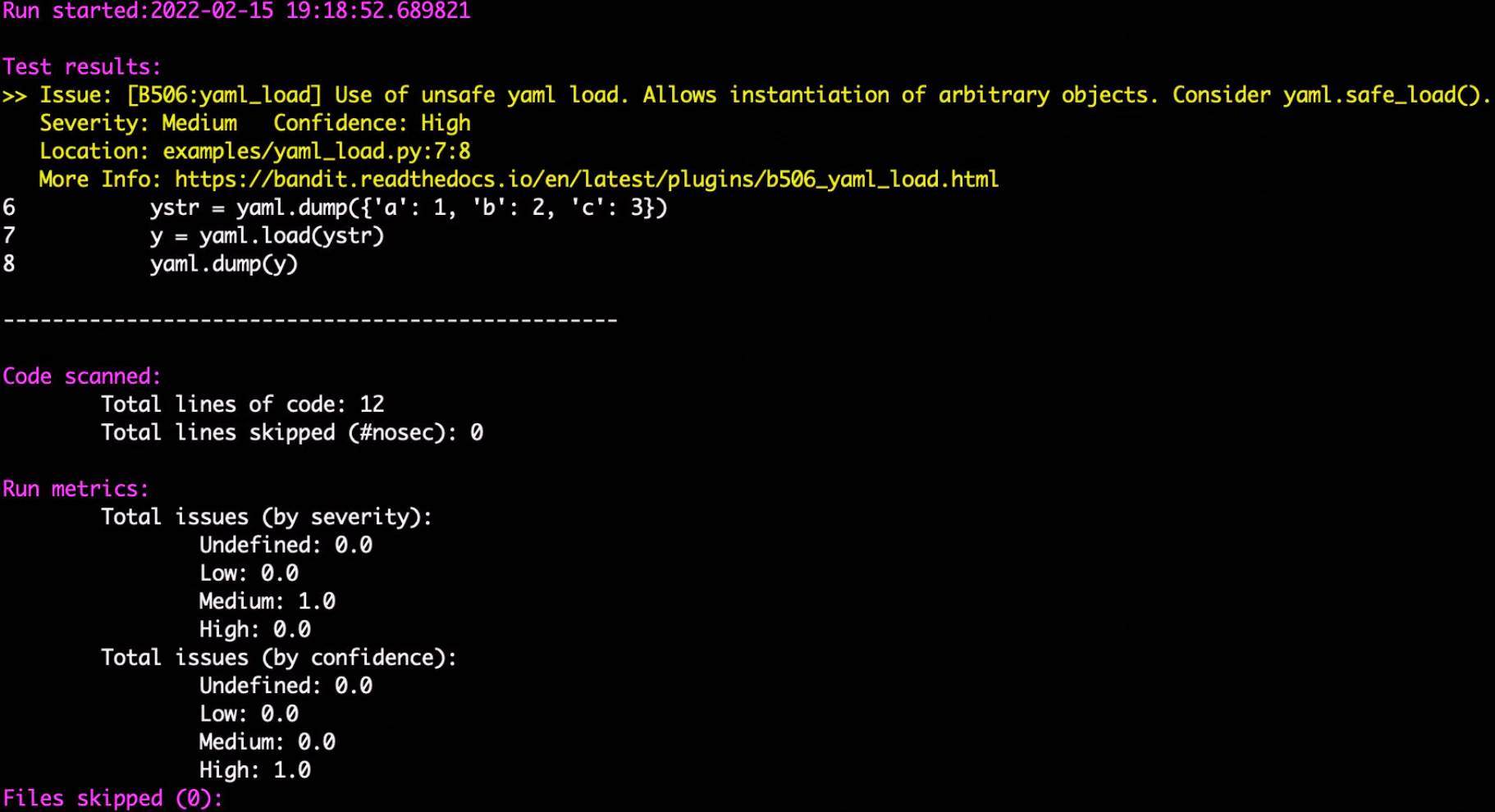
Comme d'autres outils, vous pouvez configurer le format des outputs en HTML pour les humains, ou en JSON, XML, CSV, ou un autre format pour l'ingestion programmatique par des outils CI/CD.
8. Psalm
Psalm est un autre outil SAST pour PHP qui s'intègre à un IDE pour fournir un feedback en temps réel pendant le développement. Ainsi, il peut détecter des erreurs de type, du code inatteignable et d'autres problèmes logiques dans votre base de code. Atout notable : il est livré avec un autre outil, Psalter, capable de corriger automatiquement certains problèmes détectés par Psalm.
Psalm est donc idéal pour les grandes bases de code, où les mêmes problèmes peuvent apparaître des dizaines de fois.
9. PMD
PMD est un analyseur statique polyvalent avec des règles couvrant la qualité de code, la performance et certains indices de faiblesse de sécurité sur de nombreux langages ; il s'intègre proprement avec Maven/Gradle et la CI.
Pour une couverture sécurité Java plus complète, associez PMD à SpotBugs et au plugin FindSecBugs pour détecter des risques classés OWASP (par exemple, injections, désérialisation non sécurisée, crypto faible) lors des builds et des pull requests. Cette combinaison offre ainsi des contrôles de qualité étendus avec des résultats sécurité ciblés.
Inside the 2026 CISO Budget Benchmark
See how 300+ CISOs are planning, spending, and prioritizing for the year ahead. Compare your strategy against peers and identify emerging trends.
Get the report
Priorisez l'essentiel avec Wiz
Wiz apporte le contexte cloud à l'analyse statique, aidant les équipes à se concentrer sur les problèmes qui comptent vraiment. En effet, les outils SAST traditionnels remontent des vulnérabilités de code, mais Wiz va plus loin en reliant ces détections à des erreurs de configuration, à des risques CI/CD et à des expositions cloud. Ainsi, cela aide les équipes à prioriser ce qui est réellement exploitable en production.
En corrélant les problèmes à de vrais chemins d'attaque, Wiz réduit le bruit et les faux positifs. Les équipes peuvent donc se focaliser sur les risques qui comptent et remédier plus vite.
Intégrez le SAST dans vos pipelines CI/CD, à votre façon
Wiz est conçu pour la flexibilité. En effet, les équipes peuvent adopter le SAST de la manière la mieux adaptée à leur stack et à leur niveau de maturité :
utilisez le scanner SAST natif de Wiz pour une détection contextualisée au cloud, un tri assisté par l'IA et une remédiation guidée ;
conservez vos outils en important les résultats de vos scanners SAST et SCA existants, sans perturber les workflows.
Les deux options s'intègrent directement aux pipelines CI/CD, pour des contrôles de sécurité tout au long du cycle de développement.
Ainsi, Wiz identifie des problèmes comme les failles d'injection, les API non sécurisées et les erreurs de codage, et enrichit chaque détection avec du contexte cloud. Les développeurs reçoivent donc des instructions de remédiation claires et actionnables dans leur IDE ou leur pull request, afin de corriger rapidement et d'avancer.
En parallèle, Wiz Code détecte des erreurs de configuration, des secrets codés en dur et des risques à travers l'IaC, Kubernetes et les environnements cloud.
Notre objectif était simple : fournir aux développeurs les bons outils, pas plus de tickets. Avec la plateforme ASPM Wiz Code et le moteur SAST, les développeurs disposent désormais de recommandations actionnables, incluant l'extrait de code vulnérable, un contexte runtime complet et des options de remédiation par l'IA. Au final, ce workflow intégré accélère et améliore la remédiation dans notre modèle de sécurité continu et horizontal.
Simon Goldsmith, CISO chez OVO
SAST natif + Agent IA, propulsés par le Wiz Security Graph
Wiz inclut un scanner SAST intégré et un Agent IA dédié qui travaillent de concert pour améliorer la précision, réduire le bruit et accélérer la remédiation.
Ainsi, le scanner effectue une analyse approfondie, sensible aux langages, tandis que l'Agent IA :
trie et regroupe les détections par cause racine ;
déduplique les résultats à travers services, langages et scanners ;
explique le risque en langage clair ;
propose des correctifs — dans le code comme dans le cloud — en fonction des expositions réelles ;
associe les problèmes à leurs responsables via les métadonnées des dépôts, CODEOWNERS et les catalogues de services.
L'ensemble est enrichi par le Wiz Security Graph, qui relie SAST, SCA, IaC, configuration cloud, identité et signaux runtime dans un modèle de contexte unifié.
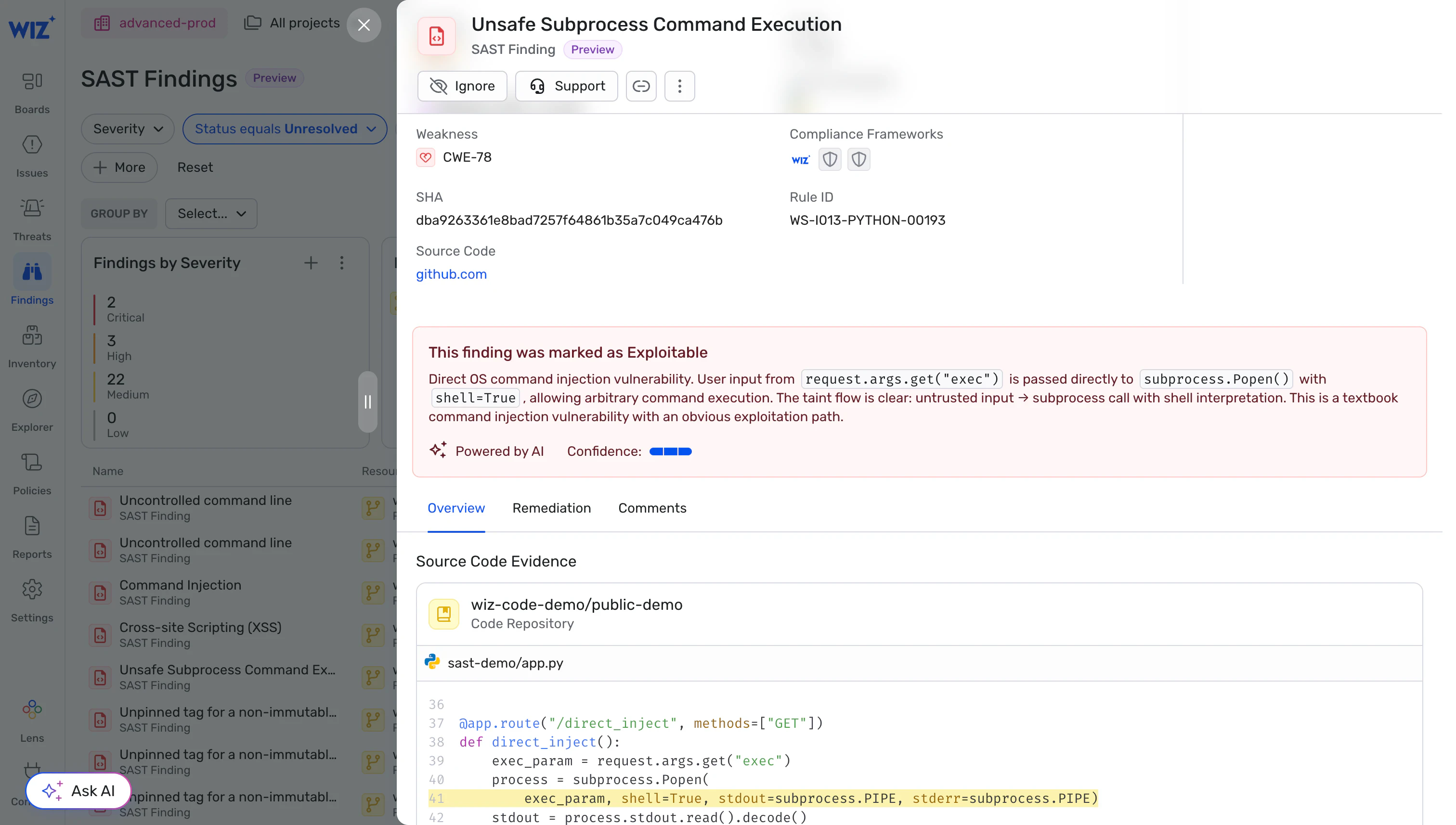
Une couche d'intelligence unique, pour toutes les détections
Wiz applique la même intelligence à toutes les détections, qu'elles proviennent de Wiz ou d'outils externes. Ainsi, la plateforme :
regroupe et déduplique automatiquement les problèmes ;
relie les vulnérabilités aux ressources cloud et aux identités qui les exécutent ;
fait remonter uniquement les risques qui constituent de vrais chemins d'attaque ou un impact métier.
Résultat : moins de bruit, plus de signal — et une remédiation plus rapide à l'échelle des équipes.
Prêt à aller à l'essentiel et à réduire le bruit ? Demandez une démo pour voir comment Wiz SAST fonctionne dans votre environnement.
Autres sélections d'outils