

El uso de software de código abierto (OSS) tiene muchas ventajas, como la eliminación de la dependencia de un proveedor, los bajos costes de uso y la flexibilidad del código fuente. Estos beneficios pueden explicar por qué 96% de las aplicaciones empresariales tienen una forma de componente de código abierto u otra. Sin embargo, la seguridad es un inconveniente potencial de OSS porque tanto los usuarios legítimos como los ciberdelincuentes pueden acceder y reutilizar fácilmente el código OSS, por lo que es fundamental identificar y resolver las vulnerabilidades de forma proactiva.
Los equipos de seguridad pueden manejar las vulnerabilidades mediante la adopción de herramientas de escaneo de vulnerabilidades de código abierto. Son gratuitos y ofrecen una variedad de funciones, así que siga leyendo para obtener un resumen completo de nuestras mejores opciones, incluidas las capacidades básicas para compararlas al elegir la solución más adecuada.
AWS Vulnerability Management Best Practices [Cheat Sheet]
This 8-page cheat sheet breaks down the critical steps to fortifying your AWS security posture. From asset discovery and agentless scanning to risk-based prioritization and patch management, it covers the essential strategies needed to safeguard your AWS workloads.
Download Cheat Sheet
Gestión de vulnerabilidades de OSS: un repaso rápido
Las vulnerabilidades de software de código abierto son brechas de seguridad explotables o fallas dentro de la base de código de bibliotecas y marcos de código abierto, por ejemplo, software desactualizado, software o actualizaciones falsificadas, configuraciones incorrectas, etcétera. La gestión de vulnerabilidades de software de código abierto es el uso de herramientas dedicadas y automatizadas para escanear continuamente el código OSS en busca de vulnerabilidades.
Las herramientas de gestión de vulnerabilidades de OSS buscan reducir la superficie de ataque de las organizaciones mediante la identificación y resolución proactiva de vulnerabilidades antes de que provoquen una violación o pérdida de datos. Sin estas herramientas, las vulnerabilidades pueden ser difíciles de detectar rápidamente debido a la escasa visibilidad de los componentes de software de código abierto, las dependencias y las vulnerabilidades asociadas.
El seguimiento manual de todas las vulnerabilidades del OSS y las actualizaciones correspondientes puede ser una tarea laboriosa e ineficiente. Afortunadamente, numerosos sistemas automatizados Escáneres de vulnerabilidades de código abierto se han desarrollado. A continuación, analizamos las principales capacidades que hay que tener en cuenta a la hora de elegir una solución de gestión de vulnerabilidades.
Descubrimiento dinámico de activos
Con la infraestructura de TI de las empresas cada vez más compleja, es cada vez más probable que los equipos de ingeniería adopten software sin un conocimiento completo del código abierto que contiene o de las mejores prácticas de seguridad para configurar el código.
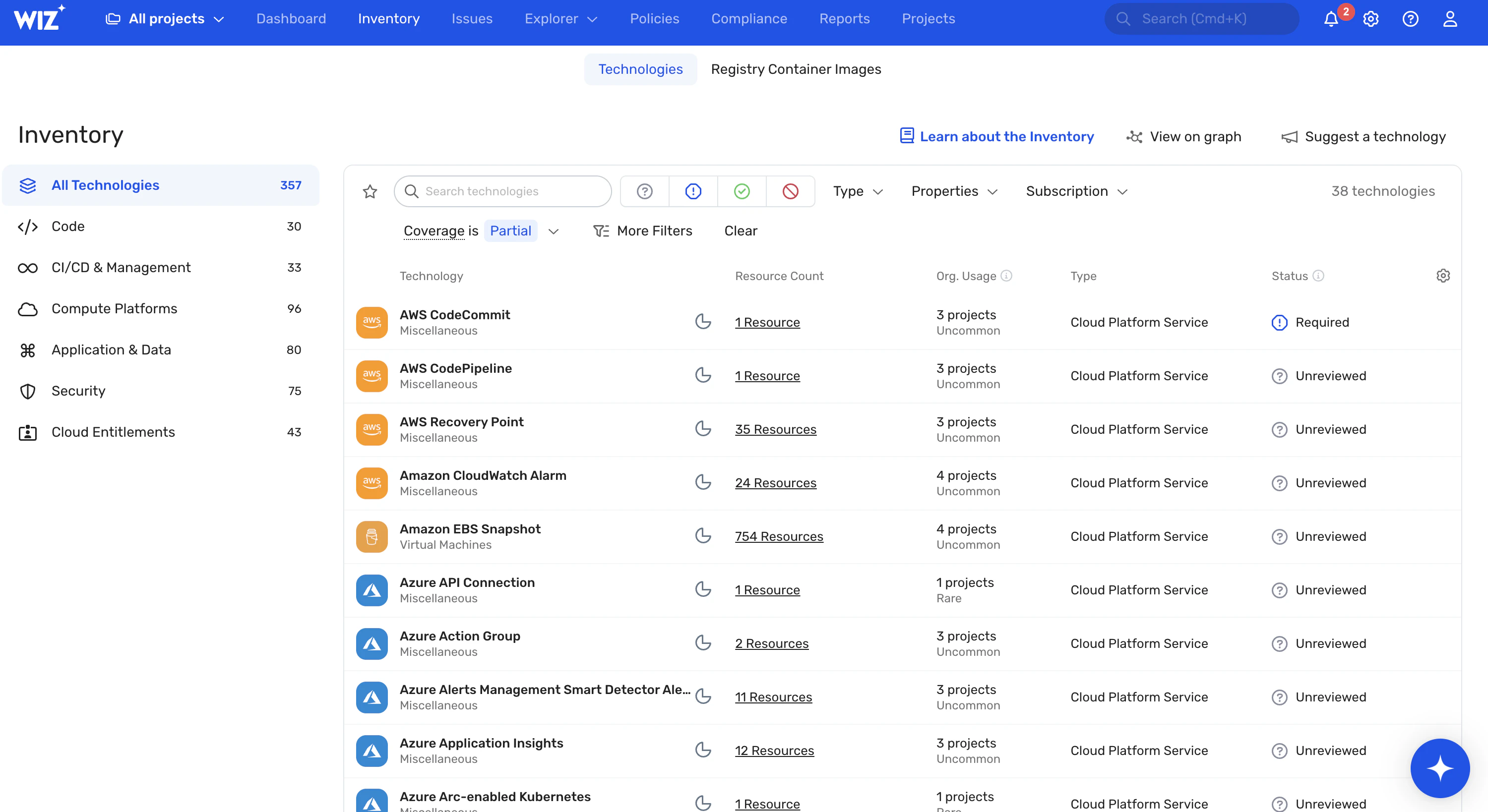
Como tal, cualquier herramienta de gestión de vulnerabilidades que se precie debe ser capaz de descubrir e inventariar automáticamente todos los activos de software, incluidas aplicaciones, máquinas virtuales, contenedores, imágenes de contenedores y bases de datos, y sus componentes de código abierto.
Integración de SCA y SBOM
Una evaluación de vulnerabilidad, completa con un Análisis de composición de software (SCA) y un Lista de materiales de software (SBOM), acelera el descubrimiento de vulnerabilidades mediante la integración de la seguridad en el ciclo de vida de desarrollo de software (SDLC).
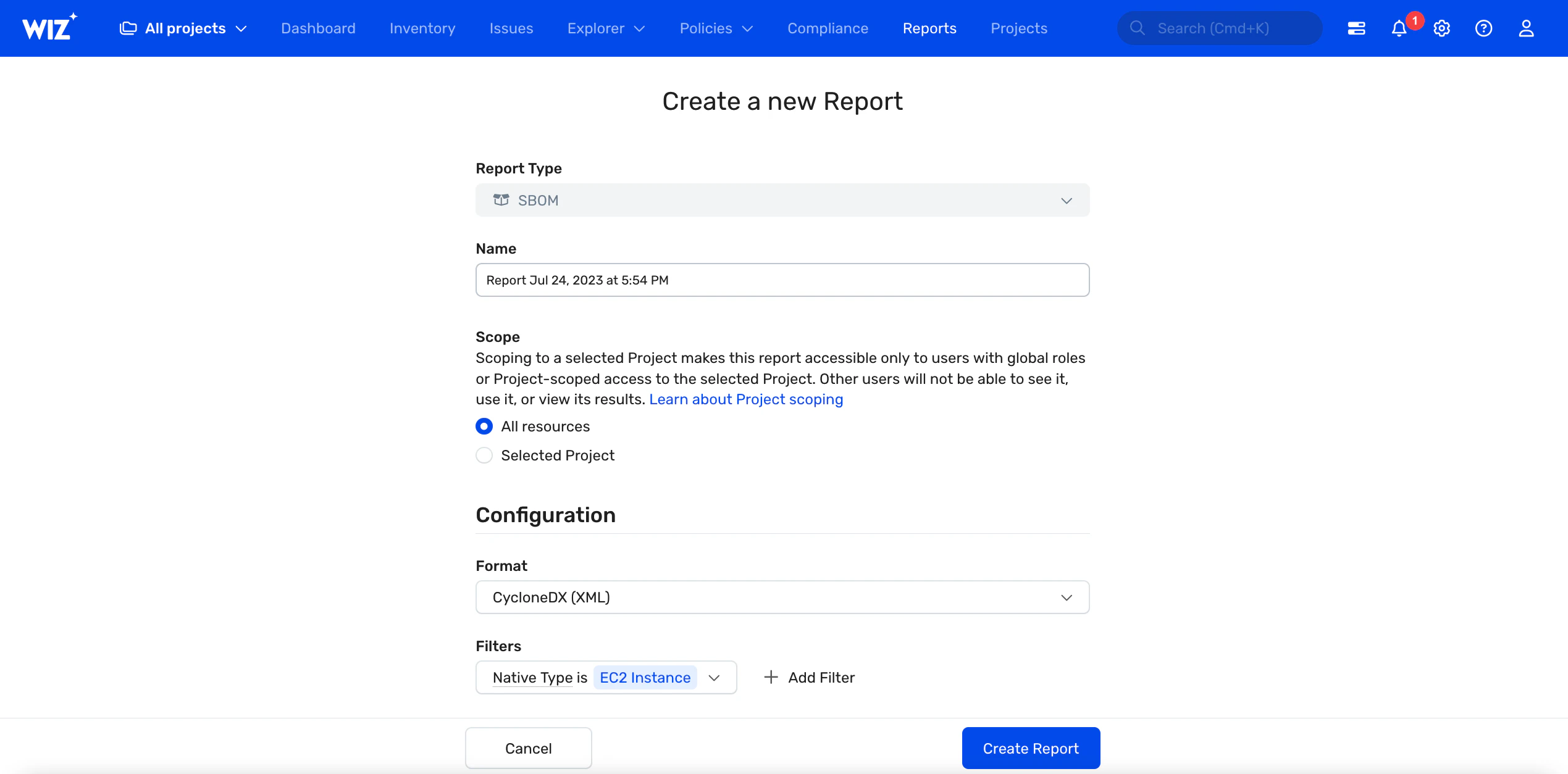
Con una SCA, los equipos de DevSecOps pueden detallar los componentes de software de código abierto, examinar las vulnerabilidades en el código fuente y los binarios, y comprobar la información de cumplimiento de licencias. También pueden usar un SBOM para rastrear las dependencias de terceros, los números de versión, las fechas de lanzamiento, las licencias, etcétera de una aplicación. para facilitar la identificación de los componentes que requieren parches.


Detección de vulnerabilidades rápida y precisa
Busque herramientas que ofrezcan un análisis rápido, completo y continuo de toda su pila para la detección proactiva de vulnerabilidades. El escaneo sin agentes también será útil, ya que es rápido y eficiente en recursos.
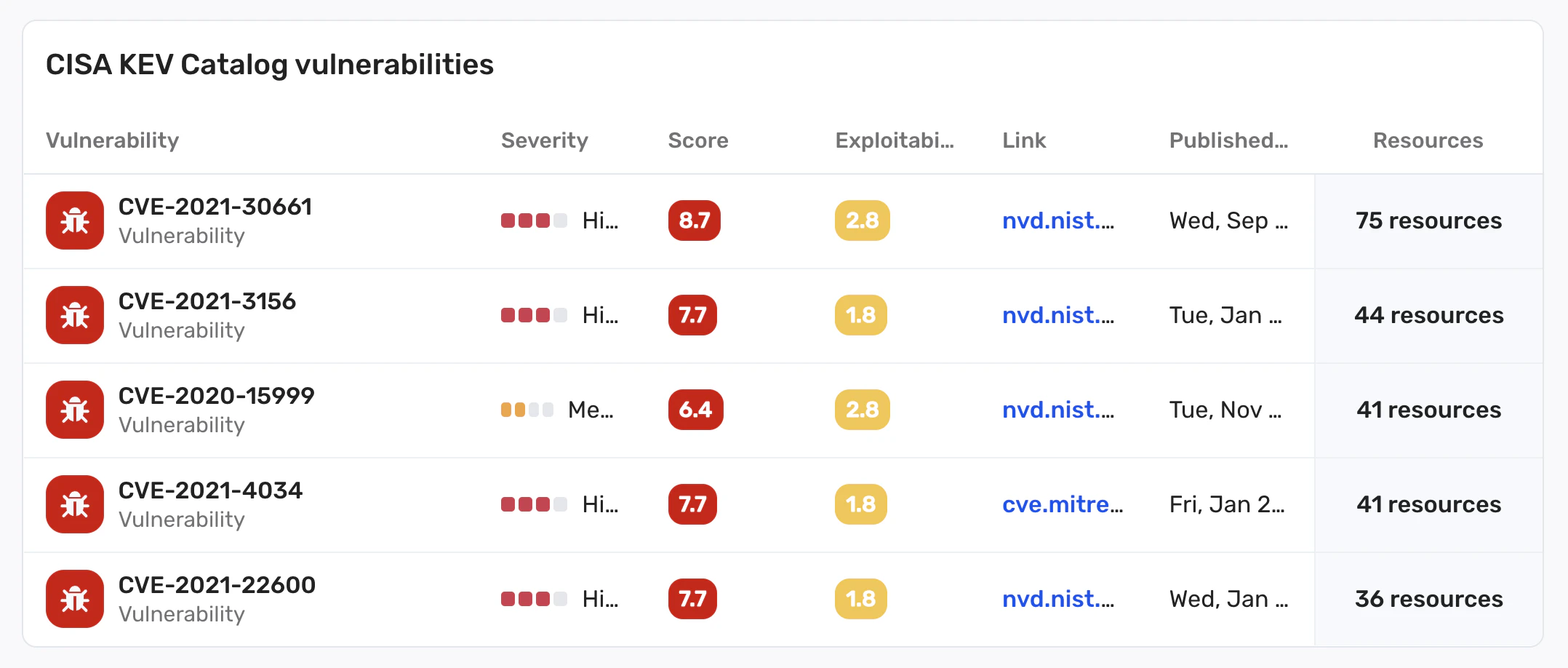
Además, la detección de vulnerabilidades debe ser precisa; Cuantos menos falsos positivos/negativos, mejor: no querrá una herramienta que genere una alarma cuando no haya ningún problema o que le dé un certificado de buena salud cuando realmente hay vulnerabilidades presentes.
Priorización basada en el riesgo
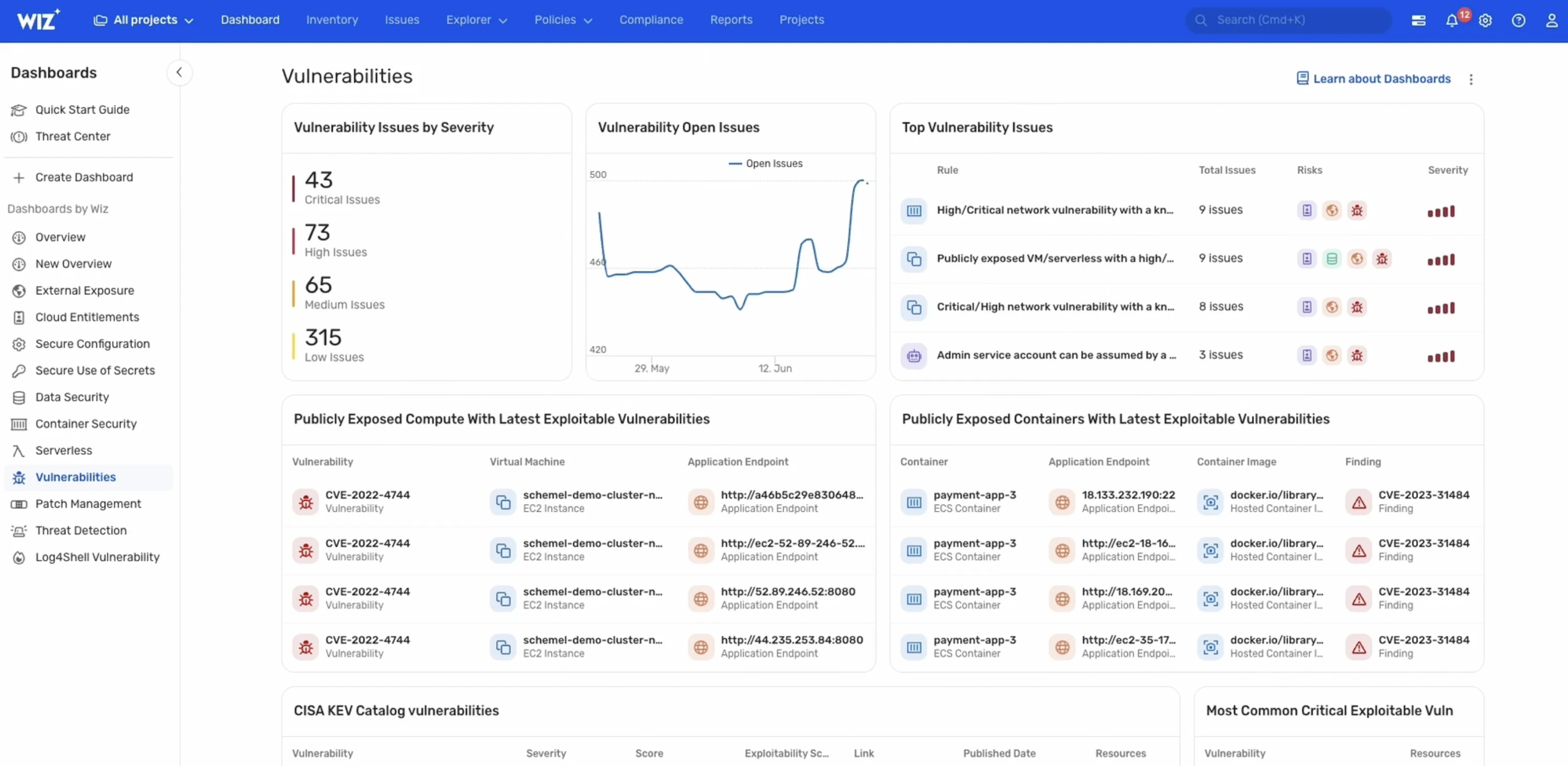
Es poco probable que algunas vulnerabilidades sean explotadas o, si se explotan, tienen muy poco impacto. La herramienta más adecuada es aquella que comprende el nivel de riesgo de una vulnerabilidad en el contexto de un negocio específico. Por lo tanto, debe clasificar las vulnerabilidades identificadas (por ejemplo, en función de la puntuación/perfil de riesgo general) para ayudar a los ingenieros de DevSecOps a equilibrar el riesgo que plantea una vulnerabilidad y los recursos disponibles.
Corrección y alerta
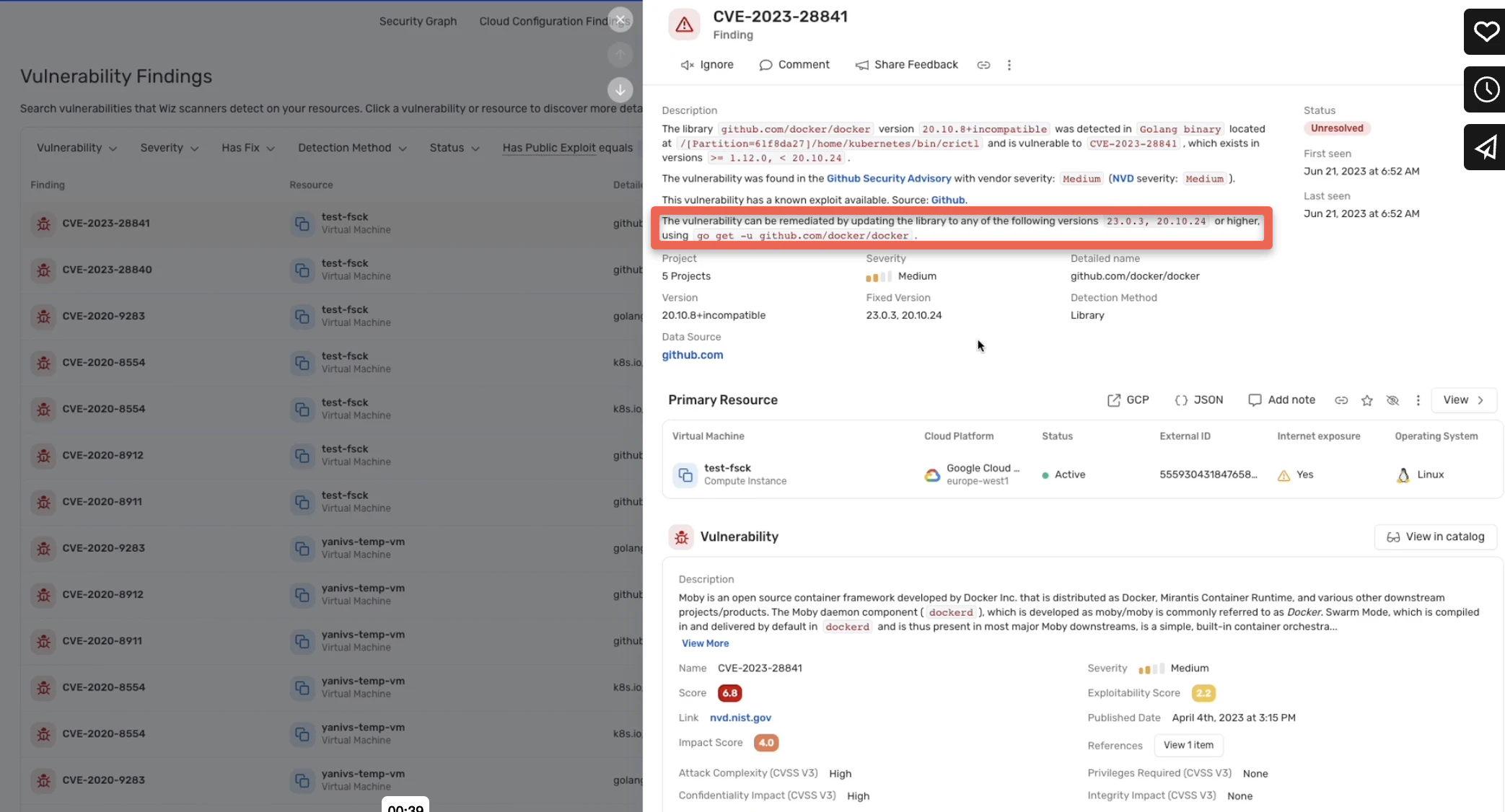
No querrás alejar siempre a tus equipos de sus tareas diarias para resolver incluso las amenazas más pequeñas. Opte por una solución que resuelva automáticamente las vulnerabilidades a través de parches o, si la vulnerabilidad no se puede resolver automáticamente, que alerte a los ingenieros de seguridad en tiempo real y ofrezca recomendaciones prácticas.
Compatibilidad
La compatibilidad puede ser un problema con las herramientas OSS. Algunos escáneres de vulnerabilidades de código abierto están diseñados para lenguajes de programación específicos (por ejemplo, Govulncheck) o sistemas operativos (por ejemplo, Vuls y Lynis para entornos Linux).
Asegúrese de que la herramienta que está eligiendo es compatible con su entorno de software.
Las mejores herramientas de gestión de vulnerabilidades de OSS
Existen varias soluciones de gestión de vulnerabilidades de código abierto en el mercado, cada una de las cuales ofrece diferentes capacidades, desde la detección básica hasta la detección y corrección avanzadas. Cubrimos las principales herramientas de código abierto y sus capacidades, separadas en sus respectivas categorías.
Escáneres de infraestructura
Nota: Una limitación general de las herramientas de esta sección es que no pueden evaluar las vulnerabilidades de sitios web y aplicaciones.
OpenVAS
Open Vulnerability Assessment Software (OpenVAS) es un escáner de vulnerabilidades de red y endpoints compuesto por varios módulos de prueba y dos componentes centrales: un escáner y un gestor. Su extensa base de datos de vulnerabilidades actualizada permite una detección precisa de vulnerabilidades de red.
OpenVAS tiene una versión gratuita y otra de pago, con las principales diferencias entre las capacidades ofrecidas y las fuentes de prueba de vulnerabilidad de red (NVT) utilizadas; la versión de pago viene con el Greenbone Enterprise Feed, mientras que la versión gratuita tiene el Greenbone Community Feed.
Características (de la versión gratuita)
Detección automática de activos, inventario y etiquetado
Instalación local o basada en la nube
Priorización de riesgos
Señalización de software obsoleto, vulnerabilidades del servidor web y errores de configuración
Interfaz web gráfica e interactiva
| Pros | Cons |
|---|---|
| User-friendly management console | Complicated to use; there may be a learning curve for some |
| Extensive vulnerability reports | Limited coverage; scans only basic endpoints and networks |
| Customization and integration options | Ideal for Linux and Windows OSes only |
| Active community; better peer support and regular updates |
OpenSCAP
Open Security Content Automation Protocol (OpenSCAP) es una plataforma basada en Linux administrada por los EE. UU. Instituto Nacional de Estándares y Tecnología (NIST) para implementar el estándar SCAP. Comprende un conjunto de módulos, incluidos OpenSCAP Base, Workbench y Daemon, destinados al escaneo de vulnerabilidades y la aplicación del cumplimiento.
Su escáner de vulnerabilidades, OpenSCAP Base, detecta vulnerabilidades comparando las etiquetas de la Enumeración de Plataforma Común (CPE) con las recuperadas de las bases de datos de vulnerabilidades. Las versiones más recientes de OpenSCAP también son compatibles con Windows.
Funciones
Detección de errores de configuración de seguridad
Evaluación del cumplimiento
Clasificación de gravedad
Escaneo de línea de comandos
Interfaz gráfica web
| Pros | Cons |
|---|---|
| Integration with multiple open-source vendors including Red Hat | Difficult to set up and use |
| Vulnerability assessment in seconds | Limited support for Windows |
| Routine and on-demand scans | No support for non-Linux and Windows OSes |
Nmapa
Network Mapper (Nmap) es un escáner de vulnerabilidades de redes y puertos de línea de comandos para sistemas Windows, Linux, macOS y FreeBSD. Nmap envía varios tipos de paquetes a las redes de destino para descubrir hosts en línea/fuera de línea, puertos abiertos/cerrados, firewalls, etcétera, así como cualquier vulnerabilidad asociada.
Funciones
Detección automática de direcciones de host, servicios y sistemas operativos
Escaneo de host y servicio con paquetes IP
Evaluación avanzada de vulnerabilidades con 500+ scripts
Detección de versiones
Huellas dactilares TCP/IP/OS
Consulta de DNS
| Pros | Cons |
|---|---|
| Highly extensible with built-in scripts | Limited user interface; only recently introduced |
| Multiple output formats including normal, interactive, grepable, etc. | Susceptible to detection and blocking due to excessive traffic and noise generation |
| Customizable network scans | No graphical network maps |
| Fast and accurate vulnerability detection |
Nikto
Nikto es un escáner de servidor web con una interfaz de línea de comandos para ejecutar comprobaciones de vulnerabilidad. Descubre vulnerabilidades de versiones de software y programas maliciosos en varios tipos de servidores y actualiza automáticamente el software obsoleto.
También comprueba si hay errores de configuración del servidor y captura las cookies para detectar el envenenamiento de las mismas. La última versión, Nikto 2.5, ofrece soporte para IPv6.
Funciones
Pruebas para +7.000 archivos/CGIs peligrosos
Detecta +1250 versiones de servidor obsoletas y +270 vulnerabilidades específicas de la versión
Soporta SSL con Perl/NetSSL para Windows y OpenSSL para sistemas Unix
Adivinación de subdominios y credenciales
Informes en formatos de texto plano, XML, SQL, JSON, etcétera.
Compatibilidad con múltiples servidores web, incluidos Nginx, Apache, Lighttpd y LiteSpeed
| Pros | Cons |
|---|---|
| Regular and automatic scan of plugin updates | Free software, but data files for running the program are paid |
| Template engine for customized reports | Requires some expertise |
| Mutation techniques and content hashing for minimizing false positives | Lengthy scan durations |
| Anti-intrusion detection software | Limited to web servers; does not scan the entire software environment |
| Authorization guessing for all directories, including root, parent, and subdirectories |
Escáneres de sitios web y aplicaciones web
Si bien estas herramientas son los principales escáneres de aplicaciones web, no pueden detectar vulnerabilidades de red e infraestructura.
Uapití
Wapiti es un escáner de vulnerabilidades de aplicaciones/sitios web y un probador de penetración. Es compatible con los métodos de ataque de penetración HTTP GET y POST.
En lugar de examinar las bases de código de las aplicaciones para descubrir vulnerabilidades, Wapiti utiliza una técnica de fuzzing para descubrir scripts vulnerables. También permite a los usuarios establecer umbrales de anomalías y enviará alertas en consecuencia.
Funciones
Huellas dactilares de aplicaciones web
Descubrimiento de múltiples técnicas de inyección SQL
Seguridad del encabezado HTTP
Falsificación de solicitudes entre sitios (CSRF), falsificación de solicitudes del lado del servidor (SSRF), inyección de alimentación de línea de retorno de carro (CRLF) y detección de inicio de sesión por fuerza bruta
Compatibilidad con proxy Man-in-the-middle (MITM)
| Pros | Cons |
|---|---|
| Scans folders, domains, pages, specific URLs | No graphical user interface |
| Five vulnerability report formats: TXT, JSON, HTML, XML, and CSV | Ideal for experienced users only |
| Color-based vulnerability reporting | |
| Customizable verbosity levels | |
| Supports pausing and resuming pen testing and vulnerability scans |
Mapa sql
SQLMAP es una herramienta de análisis de vulnerabilidades y pruebas de penetración principalmente para bases de datos. Su potente probador de penetración minimiza el ruido durante los escaneos y detecta varios tipos de vulnerabilidades de bases de datos.
Utilizando credenciales de DBMS, nombre de la base de datos, dirección IP, etcétera, evita la inyección SQL al conectarse a las bases de datos, minimizando los falsos positivos.
Funciones
Cubre varias técnicas de inyección SQL, incluidas las consultas apiladas
Compatibilidad con varios servicios de bases de datos, incluidos PostgreSQL, MySQL y Oracle
Detección de formato hash de contraseña
| Pros | Cons |
|---|---|
| Accurate vulnerability detection with advanced detection engine | Command-line tool only |
| Dictionary-based password cracking | Has a steep learning curve |
| User, role, table, column, and database enumeration | Limited to database vulnerability scans |
Suite de eructos
Burp Suite es una plataforma de seguridad de aplicaciones web que incluye un conjunto de herramientas, como Burp Spider, Burp Proxy y Burp Intruder para el análisis de vulnerabilidades y las pruebas de penetración.
Tiene una edición gratuita de Burp Suite Community y una edición de pago de Burp Suite Enterprise, que difieren en términos de rendimiento y capacidades.
Características (de la versión gratuita)
Integración CI/CD
Escaneo de contenedores
Burp Proxy para rastrear el tráfico del sitio web
Burp Spider para rastrear aplicaciones y decodificar datos de aplicaciones
Repetidor de eructos para el descubrimiento de vulnerabilidades basadas en entradas, por ejemplo, inyección SQL
| Pros | Cons |
|---|---|
| Easy to set up | Manual web app testing, not automated |
| Standard software and Kubernetes Helm chart deployment | Limited number of features compared to other open-source tools |
| Compliance audits | Considerably slower with large workloads |
| Intrusion detection only, cannot conduct pen testing |
Pez salteado
Skipfish es un sitio web automatizado, una aplicación web y una solución de pruebas de penetración para sistemas de gestión de contenido (CMS). Mediante el rastreo recursivo y el sondeo basado en diccionarios, Skipfish crea un mapa del sitio interactivo y anotado que muestra las rutas de vulnerabilidad y los directorios/parámetros expuestos.
Funciones
Tiene 15+ módulos de pruebas de penetración
Descubre la consulta del lado del servidor, XML/XPath y la inyección de comandos de shell (incluidos los vectores de inyección ciega)
Revela certificados SSL no válidos y directivas de caché problemáticas
Realiza un seguimiento de varios tipos de ataques de enumeración
| Pros | Cons |
|---|---|
| Written in C; consumes minimal CPU resources | No database of known vulnerabilities |
| Fast scans; runs 2,000 requests per second | Only ideal for Kali Linux platforms |
| Heuristics approach that minimizes false positives | Limited to penetration testing; does not resolve vulnerabilities |
| Intrusive scans; may temporarily disrupt website activity during scans |
Elegir la herramienta más adecuada
Las principales herramientas de código abierto presentadas anteriormente tienen características que pueden hacerlas ideales para pequeñas empresas con datos de bajo riesgo. Sin embargo, para las empresas con datos e infraestructura más confidenciales, las herramientas OSS tienen algunas limitaciones importantes, incluida su complejidad, problemas de compatibilidad y capacidades limitadas.
Las herramientas de código abierto no ofrecen evaluaciones completas de vulnerabilidades de todas las pilas de una empresa, lo que significa que las organizaciones pueden tener que integrar muchas de estas herramientas para cubrir completamente su nube. Además, incluso si todas las integraciones necesarias son compatibles, y esto puede ser todo un desafío, el uso de múltiples soluciones aumenta su complejidad y puede resultar en ineficiencias.
Risk Based Vulnerability Management: How to Prioritize the Threats That Actually Matter
Leer más

Wiz'S para la gestión de vulnerabilidades
Como parte de ella's Plataforma de protección de aplicaciones nativa de la nubeWiz'La solución de gestión de vulnerabilidades ofrece un enfoque robusto, sin agentes y nativo de la nube diseñado para administrar y mitigar vulnerabilidades en una variedad de entornos y cargas de trabajo en la nube. Eso'Los aspectos más destacados incluyen:
Tecnología sin agentes: Wiz utiliza un enfoque de escaneo sin agentes, aprovechando una implementación única de API nativa de la nube. Este método permite la evaluación continua de la carga de trabajo en varios entornos sin necesidad de desplegar agentes, lo que simplifica el mantenimiento y garantiza una cobertura completa.
Cobertura Integral: La solución ofrece una amplia visibilidad de las vulnerabilidades en múltiples plataformas en la nube (AWS, GCP, Azure, OCI, Alibaba Cloud, VMware vSphere, etcétera) y tecnologías (VM, funciones sin servidor, contenedores, registros de contenedores, dispositivos virtuales y recursos informáticos gestionados). Soporta más de 70.000 vulnerabilidades, cubriendo 30+ sistemas operativos, e incluye el catálogo CISA KEV junto con miles de aplicaciones.
Priorización contextual basada en el riesgo: Wiz prioriza las vulnerabilidades en función del riesgo ambiental, lo que permite a los equipos centrarse en las soluciones que tendrán el impacto más significativo en su postura de seguridad. Esto reduce la fatiga de alertas al correlacionar las vulnerabilidades con múltiples factores de riesgo, incluida la exposición externa y las configuraciones incorrectas, para sacar a la luz las vulnerabilidades más críticas que deben abordarse primero.
Evaluación profunda: La solución es capaz de detectar vulnerabilidades ocultas, como dependencias anidadas de Log4j, en una amplia gama de entornos, incluidas máquinas virtuales, contenedores, funciones sin servidor y más. Esto garantiza que incluso las vulnerabilidades más profundamente enterradas queden al descubierto.
Uncover Vulnerabilities Across Your Clouds and Workloads
Learn why CISOs at the fastest growing companies choose Wiz to secure their cloud environments.
