

Die Verwendung von Open-Source-Software (OSS) bietet viele Vorteile, darunter die Eliminierung von Vendor Lock-in, niedrige Nutzungskosten und Flexibilität des Quellcodes. Diese Vorteile könnten erklären, warum 96 % der Unternehmensanwendungen haben die eine oder andere Form von Open-Source-Komponente. Die Sicherheit ist jedoch ein potenzieller Nachteil von OSS, da sowohl legitime Benutzer als auch Cyberkriminelle leicht auf OSS-Code zugreifen und ihn wiederverwenden können, was es entscheidend macht, Schwachstellen proaktiv zu identifizieren und zu beheben.
Sicherheitsteams können Schwachstellen durch den Einsatz von Open-Source-Tools zum Scannen von Schwachstellen in den Griff bekommen. Sie sind kostenlos und bieten eine Reihe von Funktionen, also lesen Sie weiter, um einen umfassenden Überblick über unsere Top-Picks zu erhalten, einschließlich der Kernfunktionen, mit denen Sie sie bei der Auswahl einer am besten geeigneten Lösung vergleichen können.
AWS Vulnerability Management Best Practices [Cheat Sheet]
This 8-page cheat sheet breaks down the critical steps to fortifying your AWS security posture. From asset discovery and agentless scanning to risk-based prioritization and patch management, it covers the essential strategies needed to safeguard your AWS workloads.
Download Cheat Sheet
OSS Vulnerability Management: Eine kurze Auffrischung
Open-Source-Software-Schwachstellen sind ausnutzbare Sicherheitslücken oder Fehler in der Codebasis von Open-Source-Bibliotheken und -Frameworks, z.B. veraltete Software, gefälschte Software oder Updates, Fehlkonfigurationen usw. Open-Source-Software-Schwachstellenmanagement ist die Verwendung dedizierter und automatisierter Tools, um OSS-Code kontinuierlich auf Schwachstellen zu scannen.
OSS-Tools für das Schwachstellenmanagement zielen darauf ab, die Angriffsfläche von Unternehmen zu reduzieren, indem sie Schwachstellen proaktiv identifizieren und beheben, bevor sie zu einer Datenschutzverletzung oder einem Datenverlust führen. Ohne diese Tools kann es schwierig sein, Schwachstellen schnell zu erkennen, da die Transparenz von Open-Source-Softwarekomponenten, Abhängigkeiten und damit verbundenen Schwachstellen schlecht ist.
Die manuelle Verfolgung aller OSS-Schwachstellen und entsprechender Updates kann eine mühsame und ineffiziente Aufgabe sein. Glücklicherweise gibt es zahlreiche automatisierte Open-Source-Schwachstellen-Scanner entwickelt wurden. Im Folgenden werden die wichtigsten Funktionen erläutert, die bei der Auswahl einer Lösung für das Schwachstellenmanagement zu berücksichtigen sind.
Dynamische Asset-Erkennung
Da die IT-Infrastruktur von Unternehmen immer komplexer wird, ist es immer wahrscheinlicher geworden, dass Entwicklungsteams Software einführen, ohne den darin enthaltenen Open-Source-Code oder die Best Practices für die Sicherheit für die Konfiguration des Codes vollständig zu kennen.
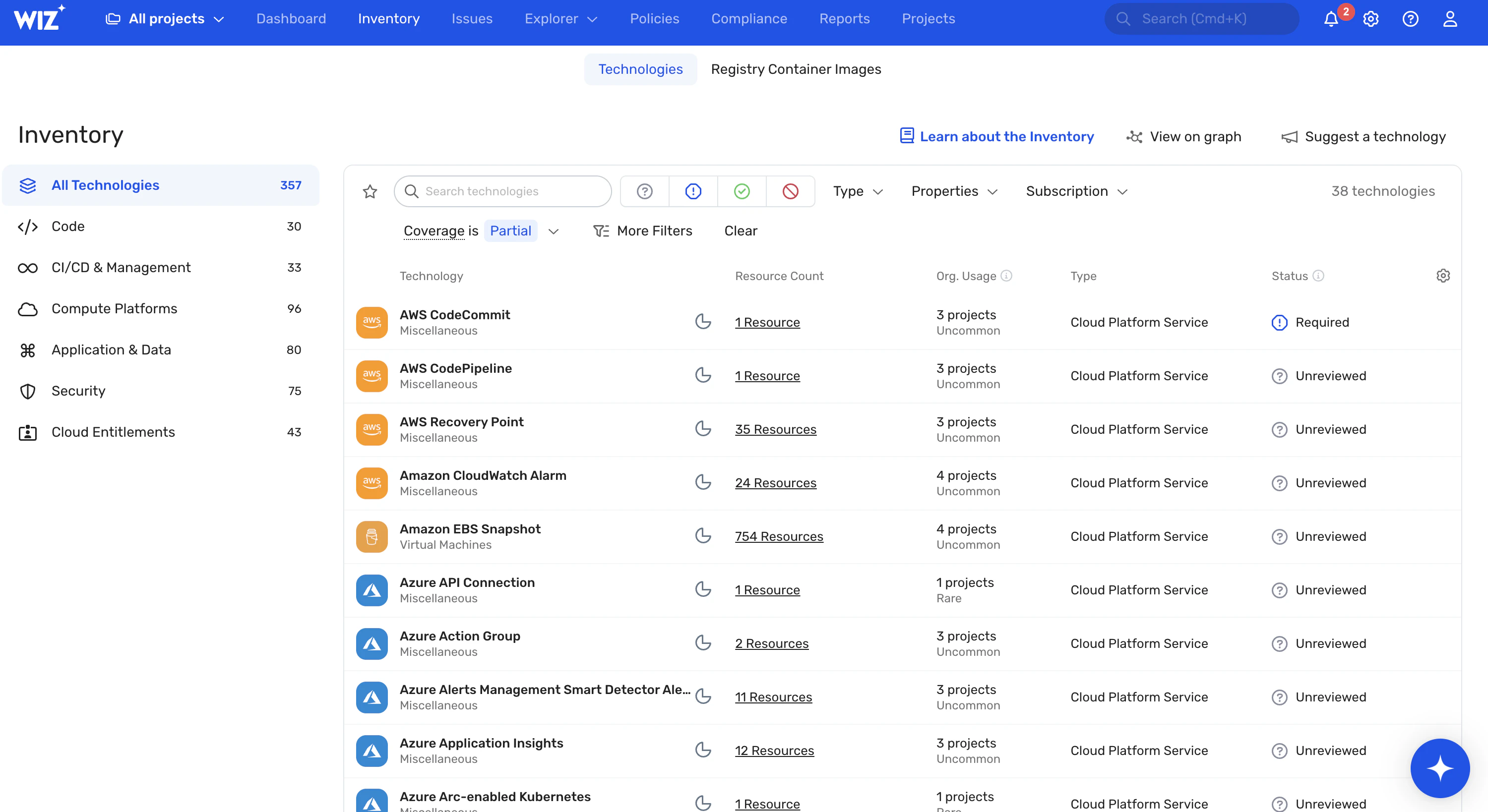
Daher muss jedes Schwachstellenmanagement-Tool, das sein Geld wert ist, in der Lage sein, alle Software-Assets – einschließlich Apps, VMs, Container, Container-Images und Datenbanken – und ihre Open-Source-Komponenten automatisch zu erkennen und zu inventarisieren.
SCA- und SBOM-Integration
Eine Schwachstellenbewertung, komplett mit einem Analyse der Softwarezusammensetzung (SCA) und ein Software-Stückliste (SBOM)beschleunigt die Erkennung von Schwachstellen, indem Sicherheit in den Software Development Lifecycle (SDLC) eingebettet wird.
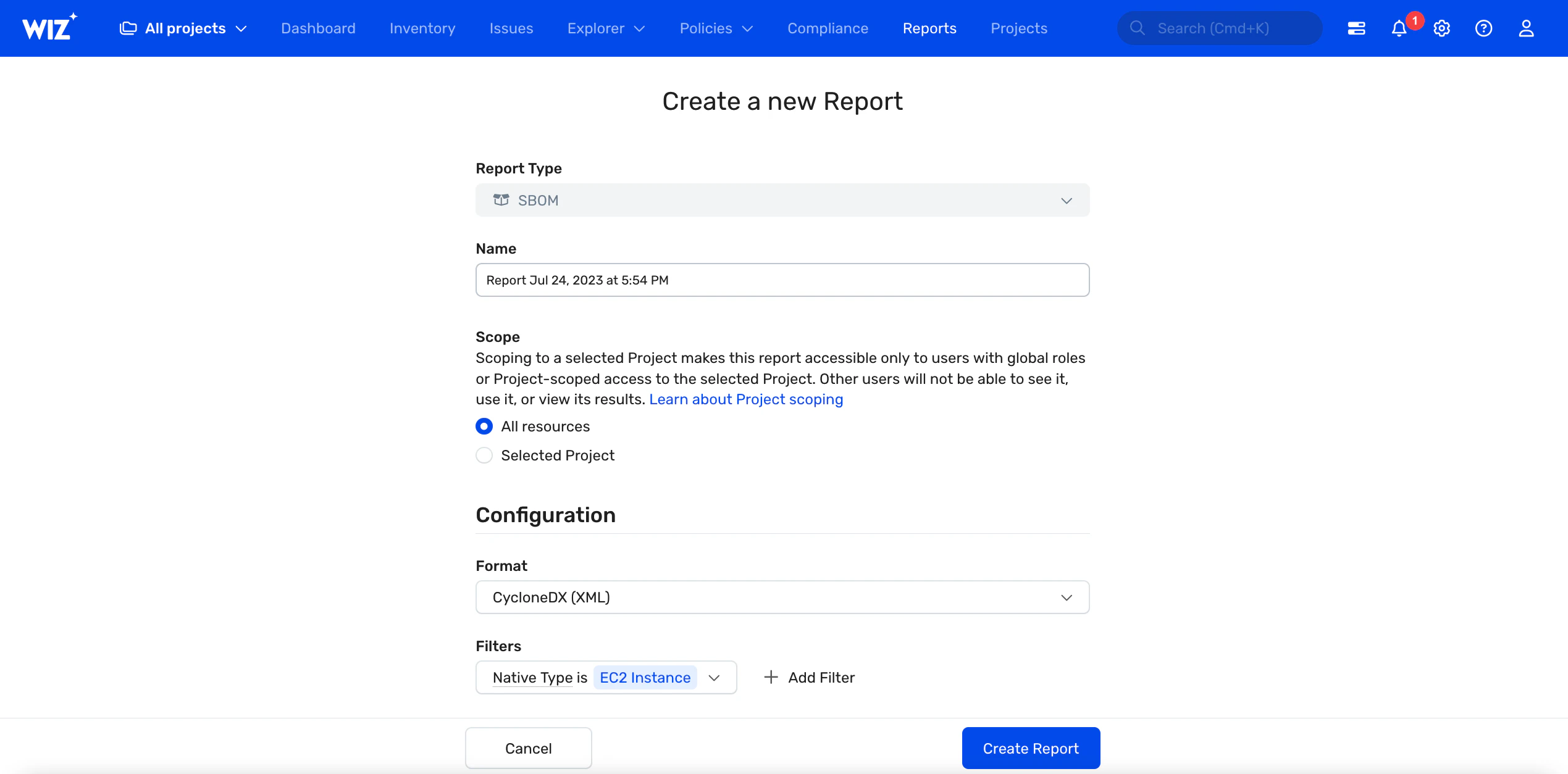
Mit einer SCA können DevSecOps-Teams Open-Source-Softwarekomponenten auflisten, Schwachstellen im Quellcode und in Binärdateien untersuchen und Informationen zur Lizenzkonformität überprüfen. Sie können eine SBOM auch verwenden, um die Abhängigkeiten von Drittanbietern, Versionsnummern, Veröffentlichungsdaten, Lizenzen usw. einer App zu verfolgen, um Komponenten, die gepatcht werden müssen, einfach zu identifizieren.


Schnelle und genaue Erkennung von Schwachstellen
Suchen Sie nach Tools, die eine schnelle, umfassende und kontinuierliche Überprüfung Ihres gesamten Stacks für eine proaktive Erkennung von Schwachstellen bieten. Das agentenlose Scannen wird sich ebenfalls als nützlich erweisen, da es schnell und ressourceneffizient ist.
Darüber hinaus muss die Erkennung von Schwachstellen genau sein. Je weniger falsch positive/negative Ergebnisse, desto besser – Sie möchten kein Tool, das einen Alarm auslöst, wenn es kein Problem gibt, oder Ihnen ein sauberes Zeugnis ausstellt, wenn tatsächlich Schwachstellen vorhanden sind.
Risikobasierte Priorisierung
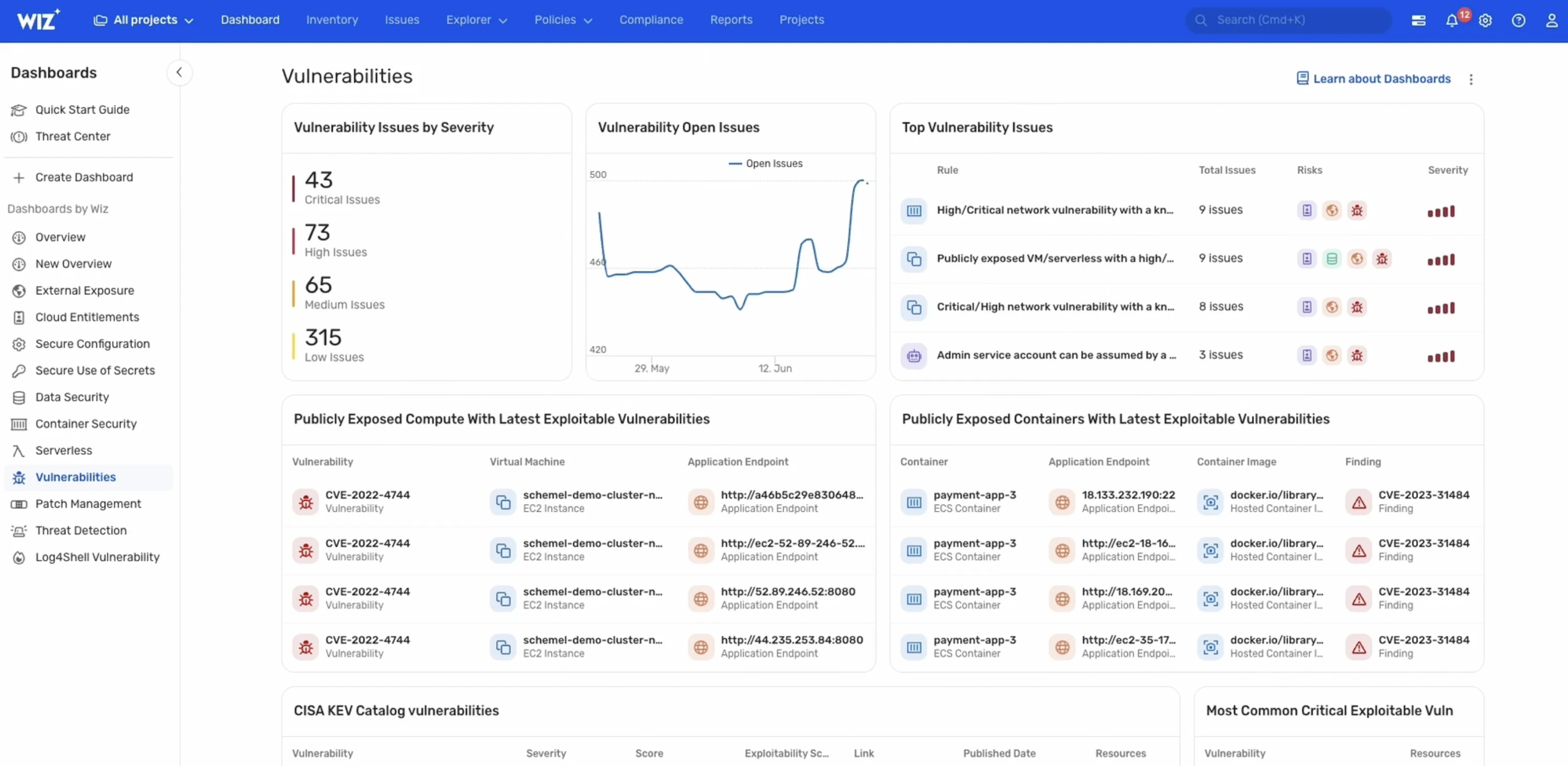
Es ist unwahrscheinlich, dass einige Schwachstellen ausgenutzt werden, oder wenn sie ausgenutzt werden, haben sie nur sehr geringe Auswirkungen. Das am besten geeignete Tool ist eines, das das Risikoniveau einer Schwachstelle im Kontext eines bestimmten Unternehmens versteht. Es sollte daher identifizierte Schwachstellen (z. B. basierend auf der Gesamtrisikobewertung/dem Gesamtrisikoprofil) einstufen, um DevSecOps-Ingenieuren dabei zu helfen, ein Gleichgewicht zwischen dem von einer Schwachstelle ausgehenden Risiko und den verfügbaren Ressourcen herzustellen.
Behebung und Warnung
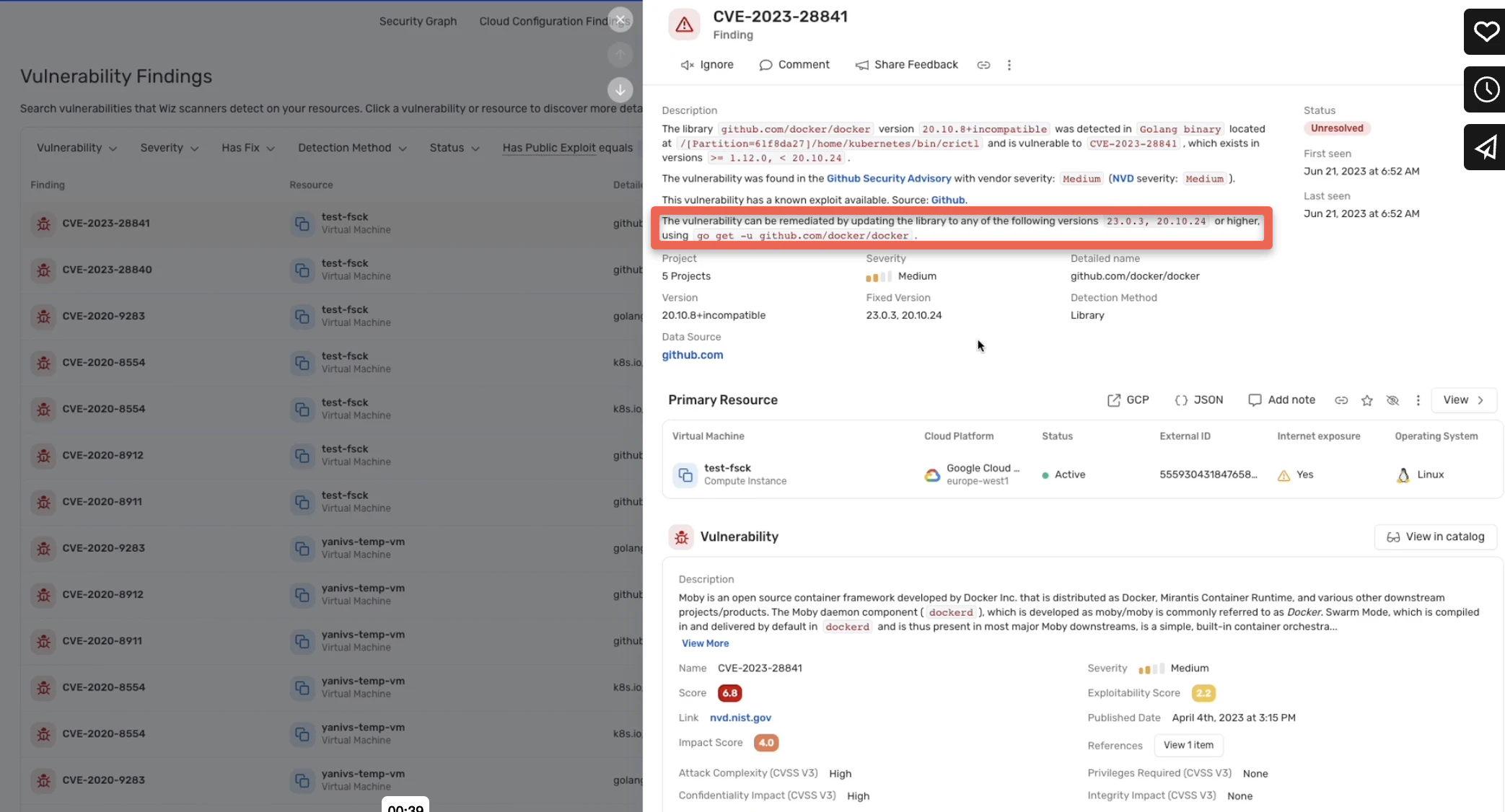
Sie möchten Ihre Teams nicht immer von ihren täglichen Aufgaben abhalten, um selbst die kleinsten Bedrohungen zu beseitigen. Entscheiden Sie sich für eine Lösung, die Schwachstellen automatisch durch Patches behebt oder – wenn die Schwachstelle nicht automatisch behoben werden kann – Sicherheitstechniker in Echtzeit benachrichtigt und umsetzbare Empfehlungen gibt.
Kompatibilität
Die Kompatibilität mit OSS-Tools kann ein Problem sein. Einige Open-Source-Schwachstellenscanner sind für bestimmte Programmiersprachen (z. B. Govulncheck) oder Betriebssysteme (z. B. Vuls und Lynis für Linux-Umgebungen) konzipiert.
Stellen Sie sicher, dass das Tool, das Sie auswählen, mit Ihrer Softwareumgebung kompatibel ist.

Die besten OSS-Tools für das Schwachstellenmanagement
Es gibt verschiedene Open-Source-Lösungen für das Schwachstellenmanagement auf dem Markt, die jeweils unterschiedliche Funktionen bieten, von der grundlegenden Erkennung bis hin zur erweiterten Erkennung und Behebung. Wir behandeln die besten Open-Source-Tools und ihre Fähigkeiten, unterteilt in ihre jeweiligen Kategorien.
Infrastruktur-Scanner
Anmerkung: Eine allgemeine Einschränkung der Tools in diesem Abschnitt besteht darin, dass sie keine Schwachstellen von Websites und Apps bewerten können.
OpenVAS (Englisch)
Open Vulnerability Assessment Software (OpenVAS) ist ein Netzwerk- und Endpunkt-Schwachstellenscanner, der aus mehreren Testmodulen und zwei zentralen Komponenten besteht: einem Scanner und einem Manager. Die umfangreiche, aktuelle Schwachstellendatenbank ermöglicht eine genaue Erkennung von Schwachstellen im Netzwerk.
OpenVAS hat eine kostenlose und eine kostenpflichtige Version, wobei die Hauptunterschiede in den angebotenen Funktionen und den verwendeten NVT-Feeds (Network Vulnerability Test) liegen. Die kostenpflichtige Version wird mit dem Greenbone Enterprise Feed geliefert, während die kostenlose Version den Greenbone Community Feed enthält.
Funktionen (der kostenlosen Version)
Automatische Asset-Erkennung, Inventarisierung und Tagging
Lokale oder Cloud-basierte Installation
Priorisierung von Risiken
Kennzeichnung von veralteter Software, Webserver-Schwachstellen und Fehlkonfigurationen
Grafisches, interaktives Webinterface
| Pros | Cons |
|---|---|
| User-friendly management console | Complicated to use; there may be a learning curve for some |
| Extensive vulnerability reports | Limited coverage; scans only basic endpoints and networks |
| Customization and integration options | Ideal for Linux and Windows OSes only |
| Active community; better peer support and regular updates |
OpenSCAP
Open Security Content Automation Protocol (OpenSCAP) ist eine Linux-basierte Plattform, die von den USA verwaltet wird. National Institute of Standards and Technology (NIST) zur Implementierung des SCAP-Standards. Es besteht aus einer Reihe von Modulen, darunter OpenSCAP Base, Workbench und Daemon, die auf Schwachstellen-Scans und die Durchsetzung von Vorschriften abzielen.
Der Schwachstellenscanner – OpenSCAP Base – erkennt Schwachstellen, indem er CPE-Tags (Common Platform Enumeration) mit denen vergleicht, die aus Schwachstellendatenbanken abgerufen wurden. Neuere Versionen von OpenSCAP unterstützen auch Windows.
Funktionen
Erkennung von Fehlkonfigurationen der Sicherheit
Compliance-Bewertung
Einstufung des Schweregrads
Scannen über die Befehlszeile
Grafische Weboberfläche
| Pros | Cons |
|---|---|
| Integration with multiple open-source vendors including Red Hat | Difficult to set up and use |
| Vulnerability assessment in seconds | Limited support for Windows |
| Routine and on-demand scans | No support for non-Linux and Windows OSes |
Nmap
Network Mapper (Nmap) ist ein Befehlszeilen-Scanner für Netzwerk- und Port-Schwachstellen für Windows-, Linux-, macOS- und FreeBSD-Systeme. Nmap sendet verschiedene Pakettypen an Zielnetzwerke, um Online-/Offline-Hosts, offene/geschlossene Ports, Firewalls usw. sowie damit verbundene Schwachstellen zu entdecken.
Funktionen
Automatische Erkennung von Hostadressen, Diensten und Betriebssystemen
Host- und Service-Scanning mit IP-Paketen
Erweiterte Schwachstellenbewertung mit 500+ Skripten
Versionserkennung
TCP/IP/OS-Fingerabdruck
DNS-Abfragen
| Pros | Cons |
|---|---|
| Highly extensible with built-in scripts | Limited user interface; only recently introduced |
| Multiple output formats including normal, interactive, grepable, etc. | Susceptible to detection and blocking due to excessive traffic and noise generation |
| Customizable network scans | No graphical network maps |
| Fast and accurate vulnerability detection |
Nikto
Nikto ist ein Webserver-Scanner mit einer Befehlszeilenschnittstelle zum Ausführen von Schwachstellenprüfungen. Es deckt Schwachstellen in Softwareversionen, Schwachstellen und Schadprogramme in verschiedenen Servertypen auf und aktualisiert automatisch veraltete Software.
Es prüft auch auf Fehlkonfigurationen des Servers und erfasst Cookies, um Cookie-Poisoning zu erkennen. Die neueste Version, Nikto 2.5, bietet IPv6-Unterstützung.
Funktionen
Tests auf 7.000+ gefährliche Dateien/CGIs
Erkennt 1250+ veraltete Serverversionen und 270+ versionsspezifische Schwachstellen
Unterstützt SSL mit Perl/NetSSL für Windows und OpenSSL für Unix-Systeme
Erraten von Subdomains und Anmeldeinformationen
Berichte in den Formaten XML, SQL, JSON usw.
Unterstützung mehrerer Webserver, einschließlich Nginx, Apache, Lighttpd und LiteSpeed
| Pros | Cons |
|---|---|
| Regular and automatic scan of plugin updates | Free software, but data files for running the program are paid |
| Template engine for customized reports | Requires some expertise |
| Mutation techniques and content hashing for minimizing false positives | Lengthy scan durations |
| Anti-intrusion detection software | Limited to web servers; does not scan the entire software environment |
| Authorization guessing for all directories, including root, parent, and subdirectories |
Website- und Web-App-Scanner
Diese Tools gehören zwar zu den besten Web-App-Scannern, können aber keine Netzwerk- und Infrastrukturschwachstellen erkennen.
Wapiti
Wapiti ist ein App/Website-Schwachstellenscanner und Penetrationstester. Es unterstützt die Angriffsmethoden GET und POST HTTP Penetration.
Anstatt App-Codebasen zu untersuchen, um Schwachstellen aufzudecken, verwendet Wapiti eine Fuzzing-Technik, um anfällige Skripte zu entdecken. Es ermöglicht Benutzern auch, Anomalieschwellenwerte festzulegen und entsprechende Warnungen zu senden.
Funktionen
Fingerabdruck von Web-Apps
Entdeckung mehrerer SQL-Injection-Techniken
HTTP-Header-Sicherheit
Cross-Site Request Forgery (CSRF), Server-Side Request Forgery (SSRF), Carriage Return Line Feed (CRLF)-Injection und Brute-Force-Login-Erkennung
Unterstützung von Man-in-the-Middle-Proxys (MITM)
| Pros | Cons |
|---|---|
| Scans folders, domains, pages, specific URLs | No graphical user interface |
| Five vulnerability report formats: TXT, JSON, HTML, XML, and CSV | Ideal for experienced users only |
| Color-based vulnerability reporting | |
| Customizable verbosity levels | |
| Supports pausing and resuming pen testing and vulnerability scans |
sqlmap
SQLMAP ist ein Tool zum Scannen von Schwachstellen und Penetrationstests, das hauptsächlich für Datenbanken verwendet wird. Der leistungsstarke Penetrationstester minimiert das Rauschen während der Scans und erkennt verschiedene Arten von Schwachstellen in der Datenbank.
Durch die Verwendung von DBMS-Anmeldeinformationen, Datenbankname, IP-Adresse usw. wird die SQL-Injection bei der Verbindung mit Datenbanken umgangen, wodurch Fehlalarme minimiert werden.
Funktionen
Deckt verschiedene SQL-Injection-Techniken ab, einschließlich gestapelter Abfragen
Unterstützung für verschiedene Datenbankdienste, einschließlich PostgreSQL, MySQL und Oracle
Erkennung des Passwort-Hash-Formats
| Pros | Cons |
|---|---|
| Accurate vulnerability detection with advanced detection engine | Command-line tool only |
| Dictionary-based password cracking | Has a steep learning curve |
| User, role, table, column, and database enumeration | Limited to database vulnerability scans |
Burp Suite
Burp Suite ist eine Web-App-Sicherheitsplattform, die eine Reihe von Tools umfasst, darunter Burp Spider, Burp Proxy und Burp Intruder für Schwachstellen-Scans und Penetrationstests.
Es gibt eine kostenlose Burp Suite Community Edition und eine kostenpflichtige Burp Suite Enterprise Edition, die sich in Bezug auf Leistung und Fähigkeiten unterscheiden.
Funktionen (der kostenlosen Version)
CI/CD-Integration
Scannen von Containern
Burp Proxy zur Verfolgung des Website-Verkehrs
Burp Spider zum Crawlen von Apps und Dekodieren von App-Daten
Burp Repeater zur Entdeckung von eingabebasierten Schwachstellen, z.B. SQL-Injection
| Pros | Cons |
|---|---|
| Easy to set up | Manual web app testing, not automated |
| Standard software and Kubernetes Helm chart deployment | Limited number of features compared to other open-source tools |
| Compliance audits | Considerably slower with large workloads |
| Intrusion detection only, cannot conduct pen testing |
Kegelfisch
Skipfish ist eine automatisierte Website-, Web-App- und Penetrationstestlösung für Content-Management-Systeme (CMS). Mithilfe von rekursivem Crawling und wörterbuchbasierter Untersuchung erstellt Skipfish eine interaktive, kommentierte Sitemap, die Schwachstellenpfade und exponierte Verzeichnisse/Parameter anzeigt.
Funktionen
Verfügt über 15+ Penetrationstest-Module
Deckt serverseitige Abfragen, XML/XPath und Shell-Befehlsinjektion (einschließlich Blind-Injection-Vektoren) auf
Deckt ungültige SSL-Zertifikate und problematische Cache-Anweisungen auf
Verfolgt verschiedene Arten von Enumerationsangriffen
| Pros | Cons |
|---|---|
| Written in C; consumes minimal CPU resources | No database of known vulnerabilities |
| Fast scans; runs 2,000 requests per second | Only ideal for Kali Linux platforms |
| Heuristics approach that minimizes false positives | Limited to penetration testing; does not resolve vulnerabilities |
| Intrusive scans; may temporarily disrupt website activity during scans |
Auswahl eines am besten geeigneten Werkzeugs
Die oben vorgestellten Top-Open-Source-Tools verfügen über Funktionen, die sie ideal für kleine Unternehmen mit risikoarmen Daten machen können. Für Unternehmen mit sensibleren Daten und Infrastrukturen weisen OSS-Tools jedoch einige wichtige Einschränkungen auf, darunter ihre Komplexität, Kompatibilitätsprobleme und eingeschränkte Funktionen.
Open-Source-Tools bieten keine umfassenden Schwachstellenbewertungen für die gesamten Stacks eines Unternehmens, was bedeutet, dass Unternehmen möglicherweise viele solcher Tools integrieren müssen, um ihre Cloud vollständig abzudecken. Selbst wenn alle erforderlichen Integrationen kompatibel sind – und das kann eine ziemliche Herausforderung sein –, erhöht die Verwendung mehrerer Lösungen deren Komplexität und kann zu Ineffizienzen führen.
Risk Based Vulnerability Management: How to Prioritize the Threats That Actually Matter
Mehr lesen

Genie's Ansatz für das Schwachstellenmanagement
Als Teil davon's Cloud-native Plattform zum Schutz von AnwendungenGenie'Die Schwachstellenmanagement-Lösung von S bietet einen robusten, agentenlosen und Cloud-nativen Ansatz zur Verwaltung und Minderung von Schwachstellen in einer Vielzahl von Cloud-Umgebungen und Workloads. Es'Zu den Highlights gehören:
Agentenlose Technologie: Wiz verwendet einen agentenlosen Scan-Ansatz, der eine einmalige Cloud-native API-Bereitstellung nutzt. Diese Methode ermöglicht eine kontinuierliche Bewertung der Arbeitslast in verschiedenen Umgebungen, ohne dass Agenten bereitgestellt werden müssen, wodurch die Wartung vereinfacht und eine vollständige Abdeckung sichergestellt wird.
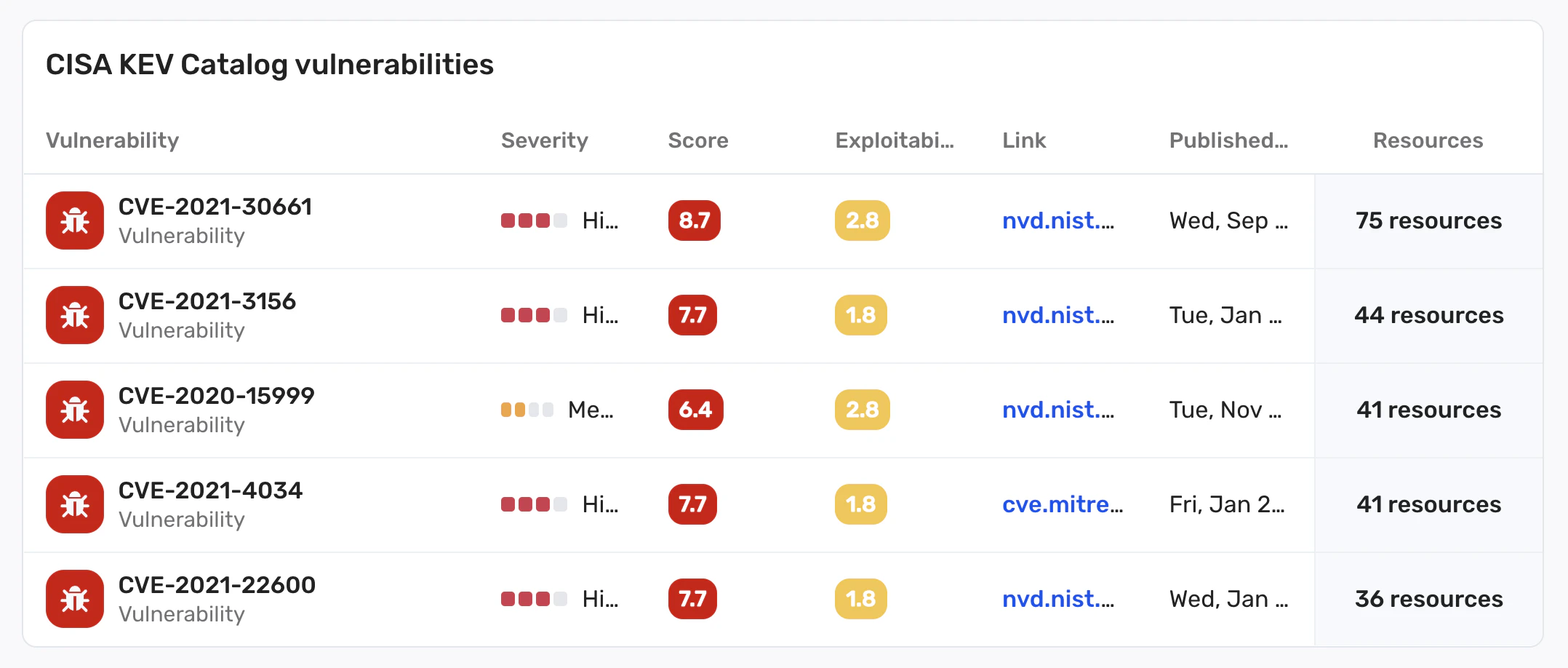
Umfassende Abdeckung: Die Lösung bietet eine umfassende Sichtbarkeit von Schwachstellen über mehrere Cloud-Plattformen (AWS, GCP, Azure, OCI, Alibaba Cloud, VMware vSphere usw.) und Technologien (VMs, serverlose Funktionen, Container, Container-Registries, virtuelle Appliances und verwaltete Rechenressourcen). Es unterstützt über 70.000 Schwachstellen, die 30+ Betriebssysteme abdecken, und umfasst den CISA KEV-Katalog sowie Tausende von Anwendungen.
Kontextbezogene risikobasierte Priorisierung: Wiz priorisiert Schwachstellen auf der Grundlage von Umweltrisiken, sodass sich die Teams auf die Behebung konzentrieren können, die die größten Auswirkungen auf ihre Sicherheitslage hat. Dies reduziert die Alarmmüdigkeit, indem Schwachstellen mit mehreren Risikofaktoren korreliert werden, einschließlich externer Gefährdung und Fehlkonfigurationen, um die kritischsten Schwachstellen aufzudecken, die zuerst behoben werden sollten.
Tiefgreifende Bewertung: Die Lösung ist in der Lage, versteckte Schwachstellen, wie z. B. verschachtelte Log4j-Abhängigkeiten, in einer Vielzahl von Umgebungen zu erkennen, darunter VMs, Container, serverlose Funktionen und mehr. So wird sichergestellt, dass auch die tiefst vergrabenen Schwachstellen aufgedeckt werden.
Uncover Vulnerabilities Across Your Clouds and Workloads
Learn why CISOs at the fastest growing companies choose Wiz to secure their cloud environments.
