Over the past four years, researchers have highlighted the risks associated with GitHub Actions. In March 2025, these threats became manifest with the tj-actions incident, a cascading compromise that moved from a vulnerable workflow to leaked PATs to poisoned actions affecting thousands of repositories. We first published this guide in May 2025 as a response.
For a detailed threat model, including trust boundaries and attack walkthroughs, see our companion Primer on GitHub Actions Security. For a broader taxonomy of SDLC infrastructure threats, check out the SITF framework.
A year later, the attacks haven't slowed down. March 2026 brought a fresh wave:
TeamPCP / Trivy-action: Attackers compromised 75 of 76 trivy-action version tags via force-push, exfiltrating secrets from every pipeline that ran a Trivy scan. Stolen credentials cascaded into PyPI compromises including LiteLLM.
Axios: Malicious versions 1.14.1 and 0.30.4 were live for approximately three hours. This was long enough to affect pipelines that resolve dependencies in real-time. The payload was hidden via an inserted dependency (
plain-crypto-js), not Axios itself.
The pattern repeats: credential theft enables lateral movement, while the window between compromise and detection is hours, not days.
GitHub has responded. Since our original guide, the platform has shipped SHA pinning enforcement, immutable releases, and changes to pull_request_target behavior. More is coming: the 2026 roadmap includes workflow lockfiles and centralized execution policies.
If you're a Wiz customer looking to assess your exposure, skip to How Can Wiz Help?.
We’ve updated this guide to reflect what's changed, what's been learned, and what you can do now. It complements GitHub's first-party guidance and aims to serve as a practical cheat sheet for a landscape that remains, frankly, difficult to secure.
GitHub Actions: Essential Terminology
It’s important to establish the key terms relevant to this domain:
GitHub Actions: A suite of automation features within GitHub that lets you automate tasks in your software development lifecycle. Actions can be used to build, test, and deploy code, among other things.
Workflow: A collection of automated tasks, defined in a YAML file, that runs in response to specific events within your GitHub repository. Think of it as a script that automates a series of Actions. Workflows can be triggered by events like pushing code, creating a pull request, on a schedule, or on demand.
Action: A reusable unit of automation that can be referenced and executed within Workflows. These can be created by you or pulled from the Marketplace and are essentially optional building blocks of Workflows. You can think of Actions like functions in a programming language—small, self-contained tasks that are reusable across Workflows.
Event: The trigger that starts a Workflow. Common events include code pushes, pull request creations, or manual triggers.
Job: A unit of work within a Workflow. Workflows can contain multiple Jobs, and each Job can run tasks (Actions). Jobs in a Workflow can run in parallel or sequentially, depending on how they're configured. Job is the minimal unit of execution schedulable on a runner.
Basically, Workflows are your automation scripts, which are built from the embedded Job code and referenced Actions.

Configuring GitHub for Safer GitHub Actions
Securing GitHub Actions starts with hardening your GitHub environment. First, secure GitHub Actions through organization-level administrative settings.
1. Set Read-Only Default Workflow Permissions
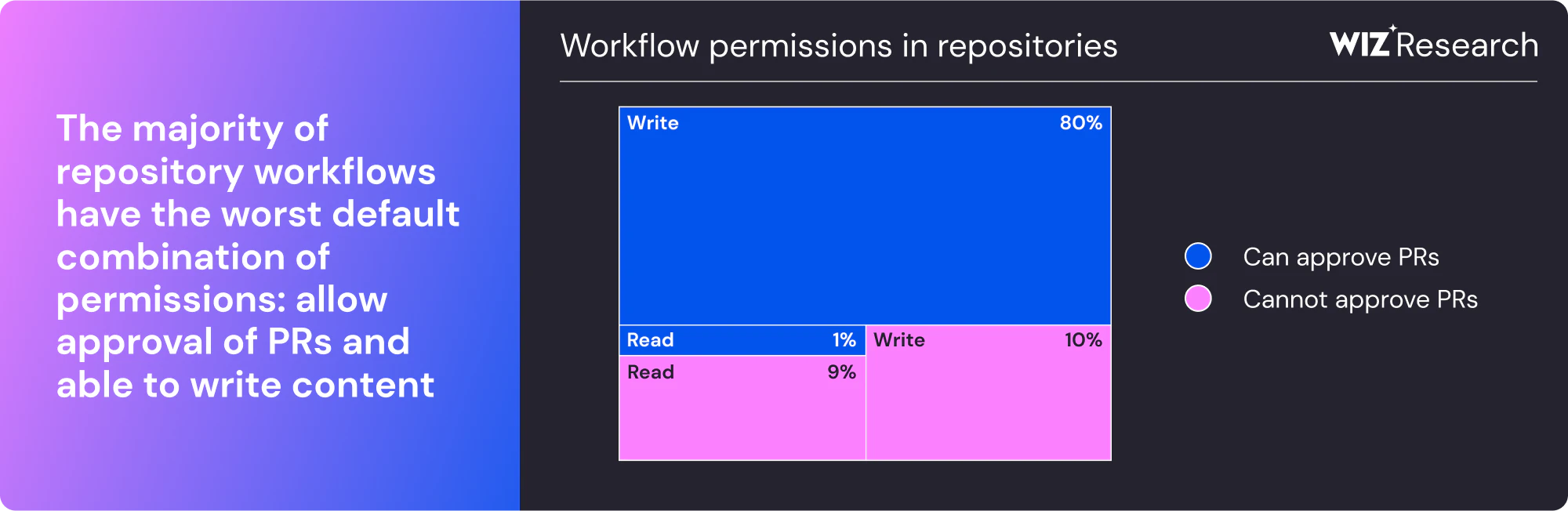
By default, the Workflow Token Permissions were set to read-write prior to February 2023. For security reasons, it's crucial to set this to read-only. Write permissions allow Workflows to inadvertently or maliciously modify your repository and its data, making least-privilege crucial.
Double-check to ensure this permission is set correctly to read-only in your repository settings.
2. Limit Actions to Verified Actions and an Allowlist
One of the key security measures is to control which Actions can run within your Workflows. You can restrict Workflows to only use verified Actions from trusted sources. This includes:
Actions created by GitHub: These are Actions maintained and supported by GitHub itself.
Actions from Marketplace-verified creators: Actions from verified creators in the GitHub Marketplace are more trustworthy, as they have undergone some level of review.
You can then use an allowlist of specific other trusted or reviewed Actions to extend permitted sources.
Since August 2025, this policy supports two additional controls: SHA pinning enforcement, which causes workflows using unpinned actions to fail (not just warn), and action blocking via ! prefix (e.g., !compromised-org/action) to rapidly block specific actions during incidents.
3. Govern Workflow Adoption and Restrict Runners to Specific Repositories
To tighten security, use a repository allowlist to control where Workflows can be adopted, and restrict self-hosted runners to specific repositories.
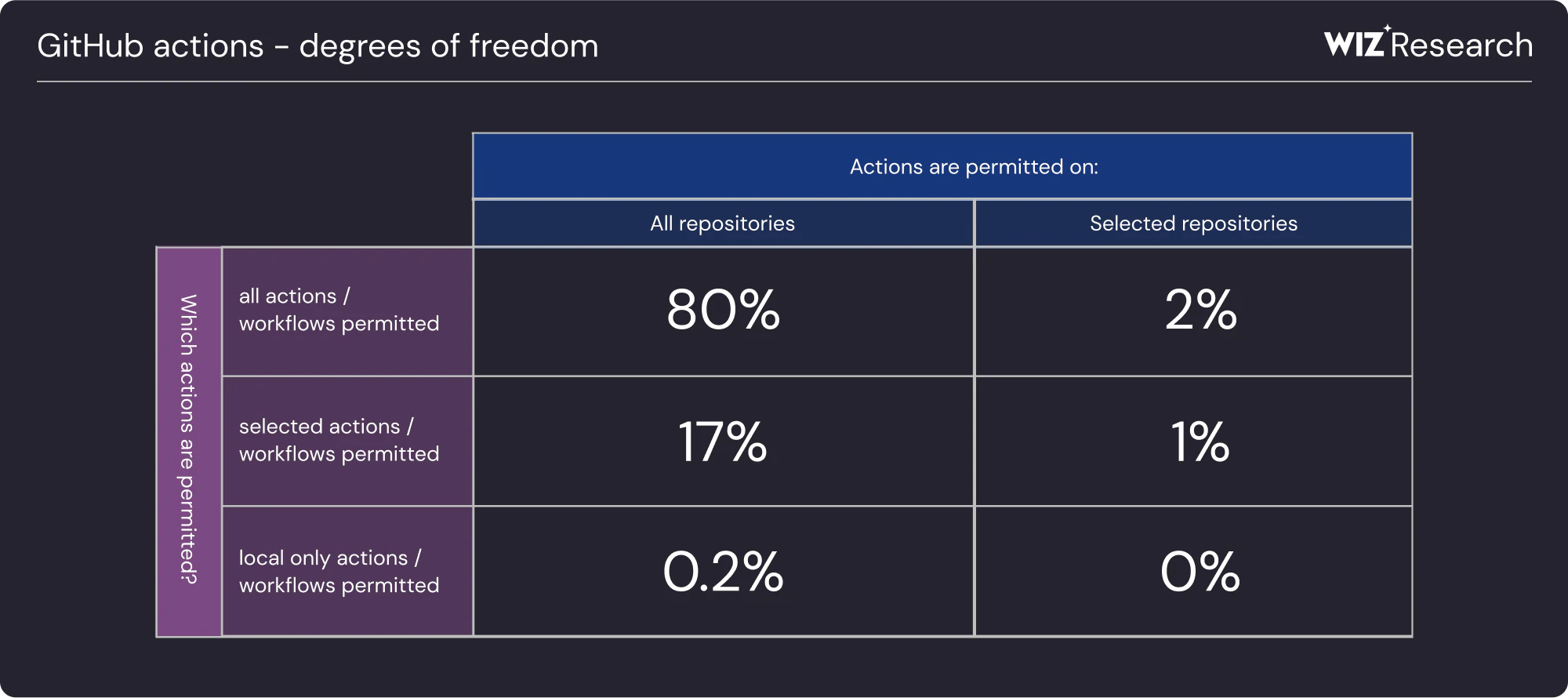
This ensures only trusted Workflows and runners are executed, reducing the risk of unauthorized access and execution.
4. Avoid ‘Allow GitHub Actions to Create and Approve Pull Requests’
Enabling this setting grants Workflows the ability to create and approve pull requests, which can be risky. Ensure this setting is deactivated, to prevent Workflows from making changes to pull request approvals or creating pull requests without manual oversight.
Branch Protection
In addition to organization-level settings, there are also repository-level controls that help secure your Workflows. Most importantly, Branch Protection and rulesets enforce rules before code can be merged, ensuring only trusted code makes it into your main and release branches. This is important because attackers often target these branches to exploit vulnerabilities in your CI/CD pipeline, where automated Workflows like deployments or tests could be manipulated.
However, branch protection has limitations. Malicious commits post-approval is an attack that occurs when an attacker injects malicious changes after a pull request is approved but before it’s merged. Pull request hijacking can happen when attackers add harmful changes to someone else's pull request, then approve it themselves. GitHub offers configuration options to close off these attack paths: “Dismiss stale pull request approvals when new commits are pushed” for the former, and “requiring an approval from someone other than the last person to push” for the latter.
However, it can be unreasonable to enable those options in agile environments, where rapid merging and flexibility are prioritized. Implementing commit signing and out-of-band detection can provide an additional layer of security.
For action maintainers: If you publish actions consumed by others, consider enabling Immutable Releases. This prevents release assets and Git tags from being modified after publication, protecting your downstream consumers from tag-rewriting attacks like the one used in the trivy-action compromise.
Secrets Management for GitHub Actions
Secrets play a role in most attacks on Github Actions. They offer opportunities for pivoting, persistence, and privilege escalation. There are three types of secrets in GitHub: repository, organization, and environment.
Repository-level secrets are specific to a single repository and should be the default choice.
Organization-level secrets are useful when you want to share secrets across multiple repositories, reducing duplication and ensuring updates or rotation propagate automatically. They work well for credentials used by general CI infrastructure, like shared build tools or third-party service tokens.
Environment-level secrets offer granular control. These secrets are only available to Jobs that reference the environment, and additional protection can be enforced with required approvals from reviewers, ensuring they are only accessible for approved Workflows. This can be ideal for sensitive actions like deployment, where you might want to restrict access from non-reviewed or unmerged pull requests.
By default, secrets (except GITHUB_TOKEN) are not passed to the runner when a Workflow is triggered from a fork and are not passed to GitHub Actions unless explicitly passed as an input or environment variable in your Workflow file.
However, beware: Any user with write access to your repository has read access to all secrets configured in your repository. So, make sure any credentials used in Workflows are safe to be exposed to that group. Where possible, prefer short-lived credentials over static secrets. OIDC support is covered in Safely Running GitHub Workflows below.
Safely Writing GitHub Workflows
Now that we've covered your GitHub Organization and Actions' configuration, let's talk about the risks to avoid when writing GitHub Workflows. Credential theft was the common thread in the most recent incidents: stolen secrets enabled lateral movement from compromised workflows to package registries.
Permissions
When writing GitHub Workflows, it's essential to manage permissions carefully. Organizations created before February 2023 are particularly vulnerable to misconfigurations due to legacy settings that grant Workflows excessive (read-write) access by default.
You can explicitly set `permissions: {}` at the Workflow level, which forces Job-level specification of any necessary permissions. This can be a powerful tool for encouraging least-privilege Workflows, while reducing the exposure of GITHUB_TOKEN, or risk associated with it, to unnecessary Steps.
Using Third-Party GitHub Actions
Using third-party GitHub Actions introduces risks, especially considering incidents like the tj-actions compromise. When referencing third-party actions in your Workflows, you can either hash pin or use tag-based versioning. However, only hash pinning ensures the same code runs every time. It is important to consider transitive risk: even if you hash pin an Action, if it relies on another Action with weaker pinning, you're still exposed. To reduce risk, prioritize Verified and GitHub-created (action/ and github/) Actions over random third-party Actions.
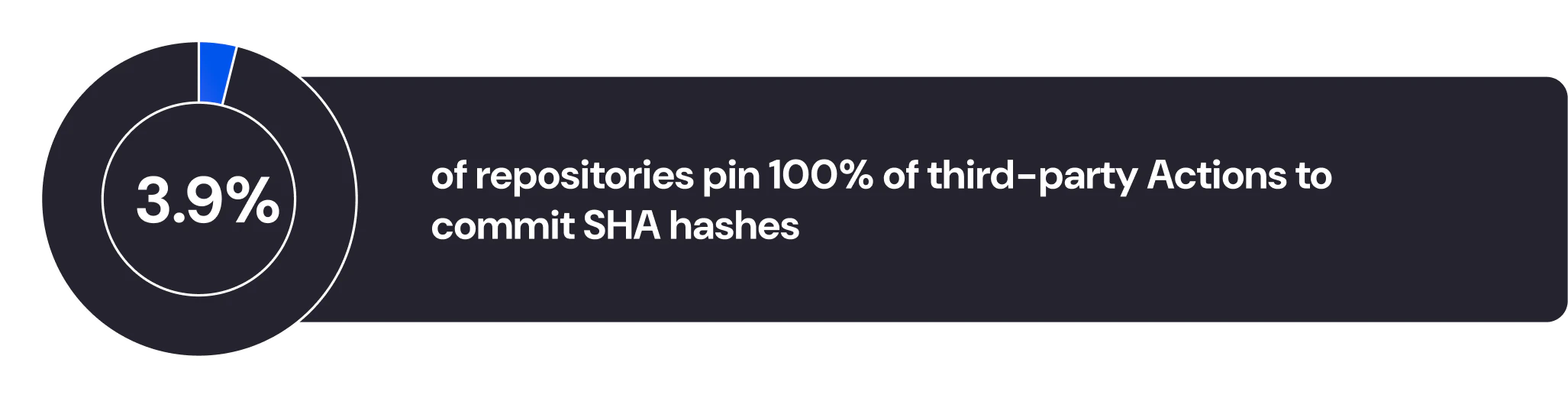
Outside of verified and GitHub-created Actions, there are several heuristics you can use to assess the risk of a third-party Action. First, consider the number of contributors; a higher number brings expanded attack surface. Next, evaluate the code complexity. Overly complicated Actions may be harder to audit for vulnerabilities and harder to trust. Popularity is another useful indicator, as more widely used Actions tend to have a larger community checking for issues. Finally, ensure that the Action follows best practices, such as proper version pinning and other safeguards we've outlined, to mitigate risks associated with supply chain vulnerabilities.
Adopt cooldowns: Even with hash pinning, you're vulnerable to compromises that occur between release and your next update. A 7-14 day delay before adopting new action versions catches 80-90% of supply chain attacks, which typically have detection windows under one week. Tools like pinact (--min-age 7) and Renovate (minimumReleaseAge) can enforce this automatically.
Lint your workflows: Tools like zizmor catch common vulnerabilities (unpinned actions, template injection, dangerous triggers) before they ship. Strongly consider adding workflow linting to your CI pipeline.
Ultimately, minimize the use of third-party Actions, as securing the supply chain comprehensively remains challenging.
Secrets
Credential theft was the common thread in the March 2026 incidents: stolen secrets enabled lateral movement from compromised workflows to package registries. Limiting secret exposure in your workflows reduces this blast radius. This means decomposing workflows, scoping secrets to specific jobs/steps, and understanding environment-level approval gates.
When working with secrets, they should be passed into the Step level env, only where needed. GitHub Actions can only read a secret if you explicitly include the secret in a workflow.
Avoid accessing the entire secrets context, such as:
# Bad, do not use this
env:
  SECRETS: ${{ toJson(secrets) }}
This antipattern exposes all secrets to the runner—even if only one is required. Instead, secrets should be accessed individually by name to limit exposure.
Along the same lines, avoid using secrets: inherit in reusable Workflows. Instead, explicitly define the secrets required by the reusable Workflow, ensuring only the necessary ones are passed along.
Common Workflow Vulnerabilities
A number of security issues in GitHub Actions Workflows fall under the broader category of Poisoned Pipeline Execution (PPE). PPE refers to any situation where attacker-controlled input reaches trusted execution paths in the CI pipeline. In GitHub Actions, this typically happens when untrusted users can influence the code, configuration, or runtime behavior of Workflows that have elevated privileges like access to secrets or write permissions.
Pwn Request
One of the most common PPE scenarios in GitHub Actions is the misuse of high-privilege triggers like pull_request_target and workflow_run.
These triggers run Workflows in the context of the base repository, not the fork. This means they have access to repository secrets.
If a workflow triggered by pull_request_target checks out and executes code from the forked branch—using actions/checkout or similar—the attacker can influence execution while the workflow has access to secrets or privileged Actions. This creates a high-risk scenario.
December 2025 update: GitHub has partially mitigated this risk: pull_request_target now always uses the default branch as its workflow source, preventing exploitation of outdated vulnerable workflows on non-default branches. However, the trigger remains dangerous with fork PRs: if your workflow checks out and runs code from the PR head, attackers can still execute arbitrary code with access to your secrets. As Astral notes, "these triggers are almost impossible to use securely."
Living Off The Pipeline
Many common CI/CD tools (linters, test runners, build systems, and security scanners) process files from the repository. Some of these tools include features that can execute code during configuration or initialization. This creates an opportunity for attackers to abuse legitimate tools to gain code execution in the pipeline.
GITHUB_ENV and GITHUB_PATH
Workflows should also avoid writing to GITHUB_ENV and GITHUB_PATH in any Step where attacker-controlled content might be used. These files influence subsequent Steps:
GITHUB_ENV allows setting environment variables
GITHUB_PATH modifies the system path
An attacker could use them to introduce malicious binaries or influence execution via environment variables like LD_PRELOAD. These mechanisms are powerful and should only be used in trusted contexts.
Command Injection via Attacker-Controlled Workflow Elements
Not all PPE involves misuse of triggers. In some cases, Workflows include logic that uses attacker-controlled inputs, generally through interpolated values in the run: Steps, dynamically evaluated parameters, or CLI arguments sourced from PR comments or issue metadata. This can lead to command injection.
Examples:
Using
run: some-command ${{ github.event.issue.title }}where issue titles are user-controlledInterpolating branch names, file contents, or labels directly into shell scripts
If Workflows use this type of dynamic behavior, inputs should be validated or sanitized. In many cases, it's safer to avoid interpolation entirely and pass values through well-defined interfaces (e.g., reusable Workflows with explicit inputs).
Artifact and Credential Handling
Workflows often use artifacts to share data between Jobs or Workflows. These artifacts can pose a security risk if they contain sensitive data (e.g., credentials, config files with secrets). actions/checkout persists a credential by default in .git/config. Later Steps have been known to accidentally publish that credential in an artifact, for example via actions/upload-artifact. Set persist-credentials: false to opt-out, unless necessary.
Safely Running GitHub Workflows
Safely running Workflows requires consideration of the underlying runner infrastructure. GitHub-hosted runners are ephemeral by default and tightly sandboxed, suitable for most use cases. However, teams often turn to self-hosted runners when they need faster execution, custom environments, or for cost optimization.
Self-hosted runners execute Jobs directly on machines you manage and control. While this flexibility is useful, it introduces significant security risks, as GitHub explicitly warns in their documentation. Runners are non-ephemeral by default, meaning the environment persists between Jobs. If a workflow is compromised, attackers may install background processes, tamper with the environment, or leave behind persistent malware.
To reduce the attack surface, organizations should isolate runners by trust level, using runner groups to prevent public repositories from sharing infrastructure with private ones. Self-hosted runners should not be used with public repositories. Doing so exposes the runner to untrusted code, including Workflows from forks or pull requests. An attacker could submit a malicious workflow that executes arbitrary code on your infrastructure.
When self-hosted runners are used, they should be instrumented as sensitive production infrastructure: monitor processes, log activity, and inspect behavior for signs of compromise. Wherever possible, use ephemeral infrastructure that tears down after each Job to minimize persistence opportunities.
Egress controls: Limit network egress to known and trusted destinations. For self-hosted runners, implement a default deny-all outbound policy with explicit allowlists for artifact repos, package registries, and required APIs. For GitHub-hosted runners, consider egress monitoring to detect and block unexpected outbound connections.
Credential isolation: For high-value operations like releases or deployments, consider moving automation credentials into GitHub Apps rather than storing them as workflow secrets. Workflows mix code and secrets in the same attack surface. compromised workflow means compromised secrets. GitHub Apps isolate credentials in a separate trust boundary, reducing blast radius when (not if) a workflow is compromised.
Finally, when Workflows connect to downstream systems, avoid long-lived secrets. GitHub supports OpenID Connect (OIDC), which allows Workflows to authenticate with cloud providers using short-lived, identity-bound tokens. This reduces credential risk and helps enforce fine-grained access control across your CI/CD pipeline.
What's Coming from GitHub
GitHub's 2026 security roadmap includes features that address some of the architectural gaps discussed in this guide:
dependencies: section: A workflow lockfile that pins all direct and transitive action dependencies with commit SHAs, like go.sum but for workflows.
Workflow Execution Protections: Centralized rulesets controlling who can trigger workflows (actor rules) and which events are permitted (event rules).
Evaluate Mode: Test new policies without enforcement to see what would be blocked before rolling out.
These features will make many of the manual hardening steps in this guide easier to enforce at scale.
How can Wiz help?
Wiz provides visibility and detection across your GitHub Actions attack surface:
Pipeline Security Posture: Wiz scans your GitHub Actions workflows to detect insecure configurations, dangerous triggers, risky inputs, and potential secret leaks. This helps you catch and proactively resolve the vulnerabilities discussed in this guide, like pull_request_target misuse or command injection via attacker-controlled inputs.
Excessive Permissions Detection: Wiz analyzes your workflow YAML files to identify jobs with overprivileged permissions, generating Issues for risky configurations that violate least-privilege principles.
GitHub Actions in SBOM: View your GitHub Actions dependencies in the SBOM page to identify third-party actions used across your organization, review their licenses, and map dependencies to specific workflows. This visibility helps you assess exposure when incidents like the Trivy-action compromise occur.
Technology Detection: Wiz detects the underlying technologies within your GitHub Actions dependencies, providing visibility into the tools, including AI and security software, running across your CI pipelines.
Built-in Detections: Wiz highlights toxic combinations for common GitHub Actions risks, including:
Publicly exposed repositories with potential script injection vulnerabilities
Public repositories hosting malware in code
Public repositories using ephemeral self-hosted CI runners exposed to external collaborators
Wiz customers can refer to the Wiz Threat Center for ongoing guidance on high-profile supply chain incidents and pre-built queries to assess risk in their environment.
Takeaways
This might seem overwhelming.
To start, focus on a few core tips to safely use GitHub Actions:
Minimize third-party attack surface through limiting third-party Actions, hash pinning the Actions you use, and adopting cooldowns before updating.
Minimize permissions and secrets granted to Workflows and used with third-party Actions, favoring OIDC where supported for integrations.
Avoid Poisoned Pipeline Execution through careful audits of high-privilege triggers and attacker-controlled workflow elements.
There are also open source tools available to help:
zizmor: a static analysis tool for GitHub Actions, with coverage for most of the common misconfigurations
trajan and Gato-X: enumeration and attack tools for testing your GitHub Actions security
allstar: a GitHub App to set and enforce security policies on GitHub organizations or repositories, from OpenSSF
Want the whole picture on risks in code and version control systems? Check out Wiz's 2025 State of Code Security Report