

Comparing common open-source vulnerability scanning tools
The open-source ecosystem covers every layer of the stack, but no single tool scans all of them. Most tools specialize in one area: static source code, third-party dependencies, or active runtime environments. As a result, teams layer multiple scanners to close blind spots across the full stack and every phase of the software development lifecycle (SDLC). Here's a quick reference to widely used open-source scanners.
| Tool Type | Tool Name | Capability | Strength |
|---|---|---|---|
| Network vulnerability scanners | Aircrack-ng | Monitoring wireless networks | Reliable packet injection |
| Network vulnerability scanners | Nmap | Network discovery and port scanning | Scriptable service/OS detection (NSE) |
| Network vulnerability scanners | Masscan | Network troubleshooting and security auditing | Fast scans |
| Application vulnerability scanners | ZAP | Web app scanning (DAST) | Automated and manual scans |
| Application vulnerability scanners | Burp Suite CE | Web application scanning and testing | Enables active and passive scans |
| Container vulnerability scanners | Trivy | Image, filesystem, and IaC scanning | Single-binary, CI-friendly |
| Container vulnerability scanners | Clair | Static container vulnerability scanning | Can be customized to suit various use cases without forking |
| Container vulnerability scanners | Anchore Engine | Container vulnerability scanning and compliance management | Can be integrated into CI pipelines for automated scans |
| Code vulnerability scanners | KICS | IaC code scanning and compliance assessment | Vulnerability risk scores |
| Code vulnerability scanners | Gitleaks | Git code scanning | Git history and version scanning |
| Endpoint vulnerability scanners | Lynis | Endpoint security auditing and hardening | Highly extensible |
| Endpoint vulnerability scanners | OSSEC | Endpoint vulnerability scanning and compliance checks | Host-based intrusion detection |
AWS Vulnerability Management Best Practices Cheat Sheet
Secure your AWS environment with this definitive guide to cloud defense. From agentless visibility to automated patching, get the essential blueprint for hardening your workloads and neutralizing risks before they scale.

Key considerations for choosing a vulnerability scanner
Effective vulnerability scanners share a few traits: they integrate quickly, cover your full stack, and help you focus on the risks that actually matter. The goal is turning signal into action, not generating more alerts.
Here are four ways to get the most value out of vulnerability scanners:
Automate early: Trigger scans on every commit and build to catch issues before they reach production.
Maximize coverage: Combine signals across cloud resources, networks, applications, containers, and hosts to reveal real attack paths.
Streamline deployment: Favor agentless or single-binary tools that deploy quickly across your cloud and CI/CD ecosystem.
Prioritize by risk: Rank findings by severity, external exposure, exploitability, and business context to focus effort where it matters most.
Network vulnerability scanners
Open ports, outdated software, and misconfigured network settings are common entry points for attackers. Network scanners detect these weaknesses across LANs, servers, and systems before they can be exploited.
Aircrack-ng
Aircrack-ng is a suite of tools designed mainly for monitoring, attacking, and cracking 802.11 wireless networks. It sniffs packets and captures hashes, collecting insights needed to crack WEP and WPA/WPA2 pre-shared key (PSK) passwords. This, in turn, lets you know how easily attackers can decrypt your network traffic and packets.
Aircrack-ng supports various attack techniques like deauthentication, packet injection, brute force, replay, and dictionary-based password cracking attacks. It comes pre-installed in Kali Linux and can be accessed by typing the following command in the terminal:
aircrack-ng --helpYou'll then receive an output displaying various Aircrack-ng commands you can deploy for your vulnerability scans.
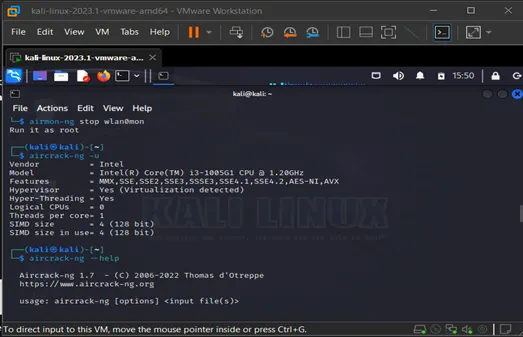
You can use any of the tools within Aircrack-ng to conduct a wide range of scans. For instance, you can scan the network using airodump-ng to find suspicious activity or rogue access points.
Nmap
Nmap (Network Mapper) is the de facto standard for network discovery and port scanning. It maps live hosts, open ports, and the services behind them, giving you a clear picture of your network's exposure before an attacker builds the same map.
Beyond discovery, Nmap fingerprints operating systems and service versions, which helps you spot outdated software and unexpected services. Its scripting engine (NSE) extends scans to detect specific vulnerabilities, misconfigurations, and weak credentials. Run a service and version scan with:
nmap -sV targetNmap returns the open ports, the services bound to them, and version details you can cross-reference against known CVEs.
Masscan
Known for its remarkable speed and scalability, Masscan is a lightweight network security vulnerability scanner and reconnaissance tool. It's ideal for scanning IP addresses, open ports, and other network components.

You can use Masscan to detect rogue services, firewall outages or tampering, or misconfigured devices that could result in sensitive data exposure.
For example, you can identify misconfigurations by scanning your entire network, focusing on commonly exploited ports such as 80, 22, and 443. Masscan then outputs a report showing all misconfigurations detected, such as an open port 21 (indicating that unencrypted FTP is being used) or weak authentication and authorization on port 22 (potentially enabling brute-force attacks and remote code execution).
Application vulnerability scanners
Web applications face unique risks like SQL injection, cross-site scripting, and insecure API endpoints. Application scanners, often called DAST (Dynamic Application Security Testing) tools, probe running applications to find these vulnerabilities before attackers do.
ZAP
ZAP (Zed Attack Proxy) is an open-source DAST tool maintained by the OWASP community. It sits between your browser and the target application as an intercepting proxy, capturing and modifying requests to probe for vulnerabilities.
ZAP runs both automated and manual scans. The automated scanner crawls an application and tests for common issues like SQL injection, cross-site scripting, and insecure headers, while the manual tools let you dig into specific requests. Active scanning attacks the application directly to confirm exploitable flaws; passive scanning inspects traffic without altering it, which is safer for production-adjacent environments.
Burp Suite CE
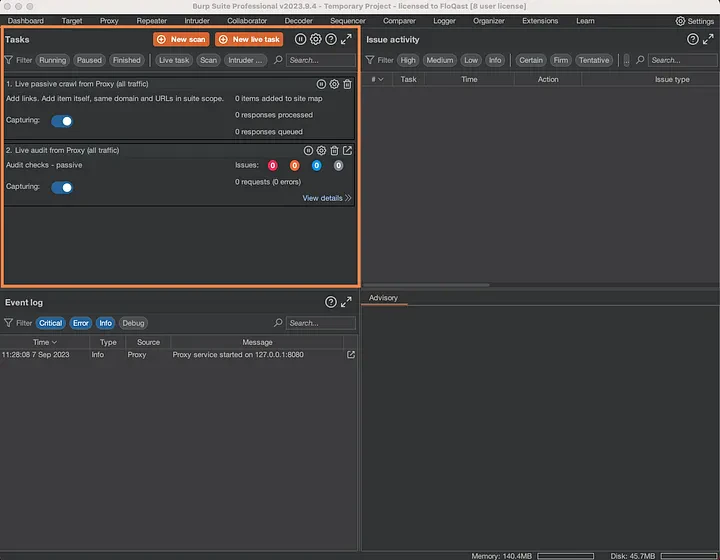
Burp Suite Community Edition provides an intercepting proxy, crawler, and manual testing tools for web application security assessment. It captures HTTP traffic between your browser and the target application, letting you inspect requests and responses for vulnerabilities.
The CE version is free but lacks automated scanning. For manual testing and learning, it remains one of the most widely used tools in the security community.
Container vulnerability scanners
Containers introduce supply chain risk through shared base images and third-party dependencies. Container scanners analyze images for known vulnerabilities in OS packages and application libraries before those images reach production.
Trivy
Trivy is a single-binary scanner for container images, file systems, and Git repositories. It detects vulnerabilities in OS packages and application dependencies, and flags misconfigurations and exposed secrets in the same pass.
Trivy pulls vulnerability data from multiple sources and runs without a separate database server, which makes it quick to drop into a CI pipeline. Scan an image with:
trivy image your-image:tagTrivy returns findings grouped by severity, so you can fail a build on critical or high vulnerabilities and let lower-severity issues through.
Clair
Clair is a scanner that conducts static vulnerability analysis of containers and container images. It's often deployed alongside built-in container vulnerability scanners available in common container registries such as AWS ECR and Quay.
Clair continuously imports CVE data from preconfigured databases, such as the National Vulnerability Database (NVD). To use Clair, create a Docker Compose file containing a Clair container (for the API) and a PostgreSQL container (for CVE data storage).
Anchore Engine
Anchore Engine is a command-line vulnerability scanner for detecting security weaknesses and compliance issues in containers within CI pipelines.
Anchore Engine works by first fetching a container image from a preconfigured registry, then generating a software bill of materials (SBOM) and indexing all components of the image. Afterward, it compares the indexed components, such as software packages, to a vulnerability database, correlating the software risks with known vulnerabilities.
Watch 12-min demo
Learn about the full power of the Wiz cloud security platform. Built to protect your cloud environment from code to runtime.

Code vulnerability scanners
Infrastructure-as-code templates and source repositories often contain misconfigurations and exposed secrets that traditional application scanners miss, a vulnerability that famously led to the Codecov breach, where secrets were exfiltrated from thousands of build pipelines.
Code scanners detect these issues early in the development lifecycle, before they reach production. With 61% of organizations having secrets exposed in public repositories according to Wiz's State of Code Security Report 2025, automated secret detection is essential.
KICS
Keeping Infrastructure as Code Secure (KICS) is an infrastructure as code (IaC) security scanner for detecting vulnerabilities in IaC tools like Terraform, Docker, and Ansible before code is shipped.
KICS comes with extensive built-in and customizable policy templates that enable it to scan IaC files for misconfigurations, vulnerabilities, and compliance violations. It covers a wide range of compliance standards, such as GDPR, PCI DSS, and HIPAA, and enforces security best practices. KICS parses IaC files, extracts relevant metadata, and matches the data against the CIS's library of built-in custom rules.
Gitleaks
Gitleaks is a code scanner for identifying hard-coded secrets, such as passwords, private keys, API keys, and tokens in code repos before they are exploited by attackers.
Gitleaks can scan code before or after it is committed to Git. If you've written some code and need to be sure it contains no secrets or vulnerabilities before pushing it to Git, you'd run the following command:
gitleaks protect . This will trigger Gitleaks to run a regex scan on the code file, comparing patterns within your code to a set of predefined patterns for detecting common secrets. You can also configure Gitleaks to automatically scan your code or repos for secrets every time code changes are made. Once it finds a matching pattern, Gitleaks alerts you, pinpointing the problematic part of the code.
Endpoint vulnerability scanners
Hosts and servers are frequent targets for initial access and lateral movement. Endpoint scanners audit these systems for OS vulnerabilities, misconfigurations, and signs of compromise that network-level tools may miss.
Lynis
Lynis is a lightweight endpoint security auditing tool for Unix-based systems. It can be used to run continuous or scheduled scans to facilitate ongoing security posture management.
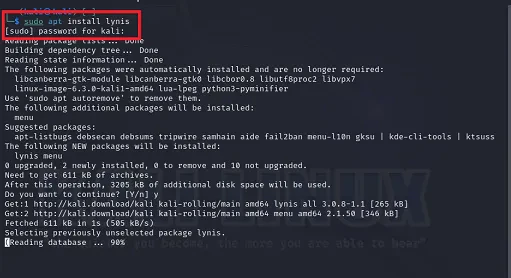
Lynis assesses endpoints for system/network configuration, file permissions, and authentication settings issues. To get Lynis to assess your endpoints for security risks, install it through the source code or package manager. Then run the audit command to scan your device remotely, locally, or to a Docker container.
OSSEC
OSSEC is a host-based intrusion detection system (HIDS) for monitoring and auditing endpoints. OSSEC detects endpoint security risks like suspicious activities, rootkits, malware, unauthorized access, and policy violations.
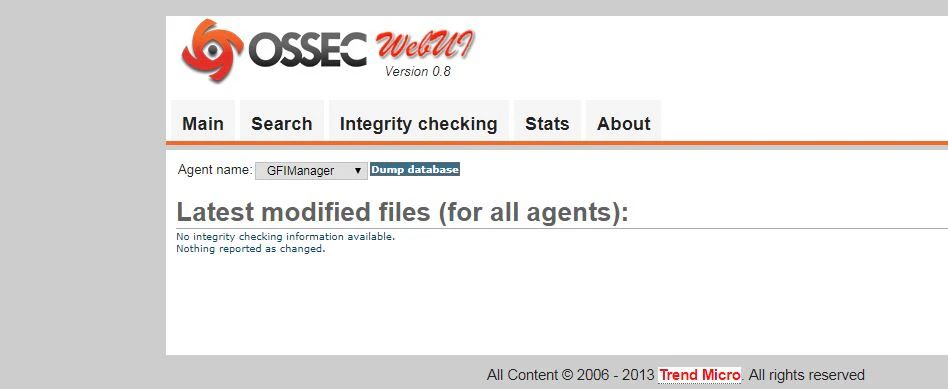
OSSEC works via agentless and agent-based deployments. It collects data from operating systems, servers, firewalls, routers, and intrusion prevention systems (IPS). It then uses predefined rules and detection signatures to detect known vulnerabilities, attack patterns, and policy violations in endpoint devices.
The CVE Database: Curated Vulnerability Intelligence by Wiz
Wiz's CVE Database curates CVE data to create easy-to-navigate profiles that cover the entire vulnerability timeline, exploit scenarios, and mitigation steps.
Explore database
Vulnerability management with Wiz
Open-source scanners surface vulnerabilities well, but acting on thousands of findings requires context at scale. As teams add scanners, results fragment across tools: duplicated alerts, disconnected workflows, and no clear way to tell which CVE actually matters. You've likely hit that wall when deduplicating findings takes longer than fixing them, or when you can spot a CVE but can't tell whether it sits on an internet-facing workload with access to sensitive data.
Wiz adds a prioritization layer that connects scan results to real-world cloud risk, accounting for exposure, identity permissions, reachability, misconfigurations, secrets, malware, and attack paths. Wiz's agentless vulnerability management discovers, prioritizes, and remediates vulnerabilities across cloud environments without the overhead of deploying and maintaining agents everywhere. As part of the Wiz Cloud and AI Security Platform, findings are enriched with cloud context so security, development, and operations teams focus on the issues that matter most.
That context extends to AI workloads. As organizations deploy models, AI services, and inference pipelines, Wiz identifies risk across AI infrastructure and connects it to the same cloud context used for traditional workloads. The result is a vulnerability management program that complements your existing open-source and commercial scanners while reducing noise and shortening remediation cycles.
Request a demo to see how Wiz complements your existing scanners.
Uncover Vulnerabilities Across Your Clouds and Workloads
Learn why CISOs at the fastest growing companies choose Wiz to secure their cloud environments.
